
3 posts tagged with "Studio"

Explore EventCatalog articles and updates about Studio.

View All Tags

See where your failed messages go, with dead letter channels

· 5 min read

When a message can't be delivered or processed, where does it go? In most architectures the answer lives in an SQS redrive policy, a RabbitMQ dead letter exchange or somebody's head, and you find out which when something breaks at 2am.

Channels in EventCatalog can now point to their dead letter channel, and say whether they are a queue, a topic or a stream. Both are in EventCatalog 5.15.

Describe your architecture, and AI draws it live

· 9 min read

Last week we launched EventCatalog Studio (v2), live canvases inside your catalog for designing what comes next with your team.

A canvas is a good place to design, but you still have to draw on it. You know what you want to explore, whether that's adding buy now, pay later to checkout, splitting the Order Service, or seeing where the Payments domain might break. Most of the work is the drawing: finding the right services, dragging them on, connecting the right messages, and laying it all out. By the time it looks right, the meeting is over.

General-purpose AI tools don't help much here. They'll draw you boxes and arrows, but they don't know your architecture, so the services are made up and the names are wrong.

Today we're adding Draw with AI to EventCatalog Studio. Describe what you want to design, and the assistant draws it on a Studio canvas while you watch. It uses the services and messages in your catalog, and the AI model you choose.

Here's what it looks like. Type a request, and the assistant draws it:

Buy now, pay later at checkoutDraftDraw with AI

An empty canvas. Describe what to design, and the assistant draws it here.

Following EventCatalog AI

Introducing EventCatalog Studio (v2): design what comes next, together

· 9 min read

EventCatalog is good at telling you how your architecture works today. Your teams document their domains, services and messages, and everyone can find out what talks to what.

But the conversations that matter most are often about tomorrow. "How would we add buy now, pay later?" "What happens if we split the Order Service?" "Who needs to know if we retire this API?"

Those conversations usually happen somewhere else: a whiteboard, a slide, a diagram tool that knows nothing about your architecture. Someone redraws the services by hand, gets a few of them wrong, and the result ends up in a folder nobody opens again.

We kept hearing the same thing from customers: we document the present in EventCatalog, but we plan the future somewhere else.

Today we're excited to introduce EventCatalog Studio (v2): live, collaborative canvases inside your catalog, for designing what comes next with your team and your AI agents.

The first version of EventCatalog Studio was a separate tool for drawing designs with architecture primitives. Studio v2 lives inside EventCatalog itself, so your designs start from the architecture you already document, and your team and your agents can work on them together.
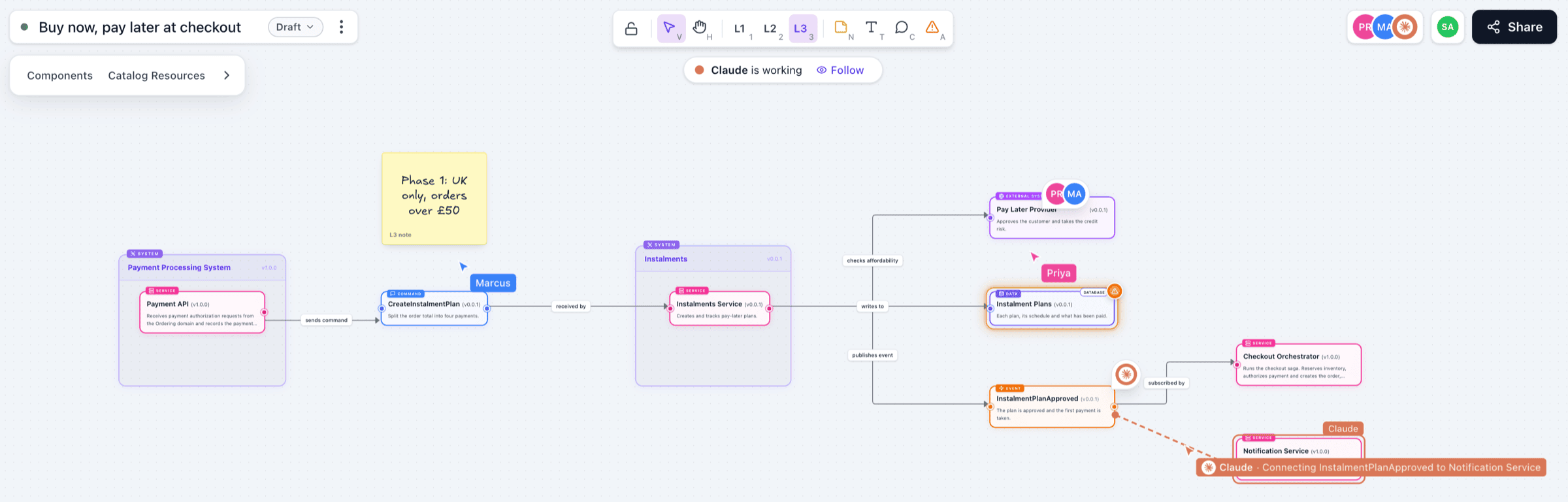

A Studio canvas called "Buy now, pay later at checkout", with Priya and Marcus on the canvas and Claude adding a new connection