October was the month of EventCatalog v5. One diagram with three levels of detail, Studio canvases with Draw with AI, your diagrams inside your AI agent, flows grouped by team, a single-file architecture export, architecture fitness functions, and plenty more.
Welcome to the monthly update for EventCatalog. At the end of September we announced EventCatalog v5 and the new licence for the project. In October we shipped it.
This has been one of the biggest months in the history of the project. EventCatalog v5 landed on the 14th, bringing one product with everything included, a new way to read your architecture diagrams, and EventCatalog Studio, live canvases inside your catalog for designing what comes next with your team and your AI agents.
We didn't stop there. Through the rest of the month we added Draw with AI to Studio, a single-file HTML export of your catalog, architecture fitness functions, support for any specification file, and a lot of polish on the new diagrams.
We started the month on 4.12.3 and finished on 5.7.5.
- EventCatalog v5 is here, read the announcement and the v5 upgrade guide
- One diagram, three levels of detail for every domain and system
- Design what comes next in EventCatalog Studio, now with Draw with AI
- Your diagrams inside your AI agent through the MCP server
- Group flows by domain, system or team
- Share your architecture as one HTML file with the architecture reference and custom exports
- Architecture fitness functions that can fail a pull request
- Attach any specification file, such as a WSDL or XML Schema
- Generators are now MIT licensed
- Other project improvements, with links to the relevant pull requests and issues, or browse every EventCatalog release
EventCatalog v5 is here
For the last couple of years EventCatalog has been open core. The catalog was free, and integrations, plugins and enterprise features were paid on top. AI changed that. Teams can now write their own generators in an afternoon, while the catalog itself (knowing what exists, who owns it and what breaks when it changes) has become more valuable, not less.
So v5 is one product. Integrations, the MCP server, the assistant, SSO and governance checks are all included. There's no EVENTCATALOG_SCALE_LICENSE_KEY to set and no plan to unlock features.
- EventCatalog stays free for individuals, open-source projects, education, and organisations with under $10M in revenue and under $10M raised.
- Larger organisations buy a licence priced by how many teams use the catalog, from $5,995 a year. No seats, no per-resource fees, and AI agents are included.
- v4 stays MIT, and every v5 release becomes MIT four years after it ships.
- Every organisation gets a 60-day free evaluation.
eventcatalog devandeventcatalog buildnow show your licence status in the terminal.
If you want the full story of why we made this change, I wrote about it in Introducing EventCatalog v5: One product, everything included. You can also find all the details on the pricing page and in the licence FAQ.
v5 also includes a few things that are easy to miss:
- A dashboard homepage. Catalogs without a custom homepage now open on a dashboard with search, Ask, counts of your domains, services, messages, flows, schemas and teams, and the architecture graph. You can add it to your own homepage with
<CatalogDashboard />. - Resources pages for services, flows, channels and messages, showing everything a resource sends, receives, reads from and writes to, with the ADRs that apply to it.
- Faster builds. Static builds render several pages at a time. A catalog with 640 events now builds in about 40 seconds, down from 50 to 75.
v5 moves to React 19 and changes a few routes, so install it from a clean install and follow the v5 upgrade guide.
One diagram, three levels of detail
In v4, a domain had a System Diagram and a Resource Diagram, a system had a Context Diagram and a Resource Diagram, and services had a Data Dependency Graph. They were all useful, but you had to know which one to open.
In v5, every domain and system has one diagram with three levels of detail.
| Level | What you see |
|---|---|
| L1 | Domains, systems and the relationships between them |
| L2 | The services and data stores inside them, and how they connect |
| L3 | Everything in L2, plus the messages and channels |
Here's how it works on the Payments domain. Click a level, or let it play:
The Payments domain at L1, L2 and L3. Read the domain diagram docs or the post One diagram, three levels of detail.
The level is kept in the URL, so you can share a link that opens at exactly the right level of detail for the person reading it. Edges are now routed at right angles around nodes too, so they no longer run on top of each other.
We kept improving the diagrams through the rest of the month:
- Domains draw their own messages. Domains have accepted
sendsandreceivessince 3.7, and the diagram now draws them, in and out of the domain's box (#2991). - Click a node to see its card. Clicking a node now shows a card next to it with its summary, what it belongs to and everything it is connected to. Click a connection to jump to that node. It's the same card Studio uses, and it replaces focus mode (#3019).
- Mermaid that keeps its boundaries. Mermaid exports of domain and system diagrams keep their boxes and levels, and the Mermaid view now works just like the diagram, with the same toolbar and levels. Entity maps export as
erDiagram(#2994). - A minimap that looks like the diagram, with resource colours and domains and systems drawn as containers (#2995).
Design what comes next in EventCatalog Studio
EventCatalog is good at telling you how your architecture works today. But the conversations that matter most are often about tomorrow. "How would we add buy now, pay later?" "What happens if we split the Order Service?"
Those conversations normally happen on a whiteboard or in a diagram tool that knows nothing about your architecture. We kept hearing the same thing from customers: we document the present in EventCatalog, but we plan the future somewhere else.
EventCatalog Studio (v2) brings live, collaborative canvases into your catalog.
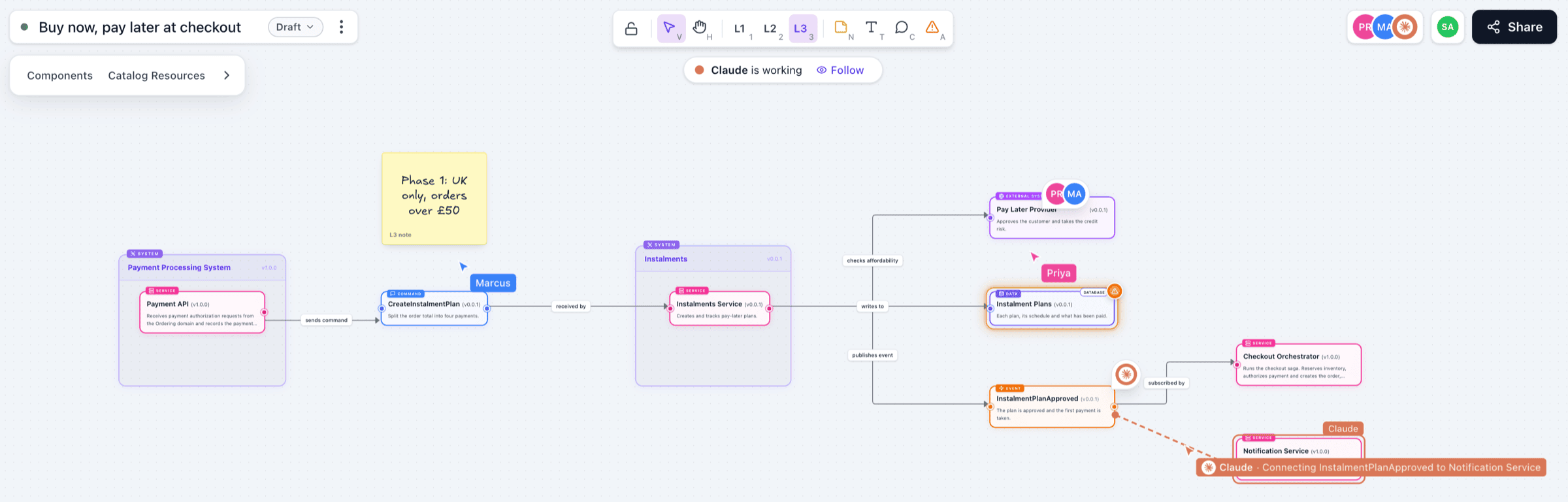
A Studio canvas with two people and Claude working on the same design. Read the Studio docs.
- Start from what you already have. Drag in the domains, systems, services and messages you already document, or use Open in Studio on any diagram to copy it onto a new canvas.
- Sketch what doesn't exist yet, with proposed services, events, systems and more, connected to the real resources around them.
- Work on it together, live, with comments, hotspots to flag risks, and a status (Draft, Proposed, Accepted, Rejected) to take a design from idea to decision.
- Bring your AI agents onto the canvas. Connect Claude, Claude Code, ChatGPT, Cursor or VS Code through the MCP server, and the agent can edit the canvas with you.
Draw with AI
A canvas is a good place to design, but you still have to draw on it. So at the end of the month we added Draw with AI (5.7.1).
Describe what you want to design, and the assistant draws it on the canvas while you watch, using the services and messages in your catalog and the AI model you choose. It only invents what doesn't exist yet, flags risks with hotspots, leaves notes, and can walk your team through the design step by step.
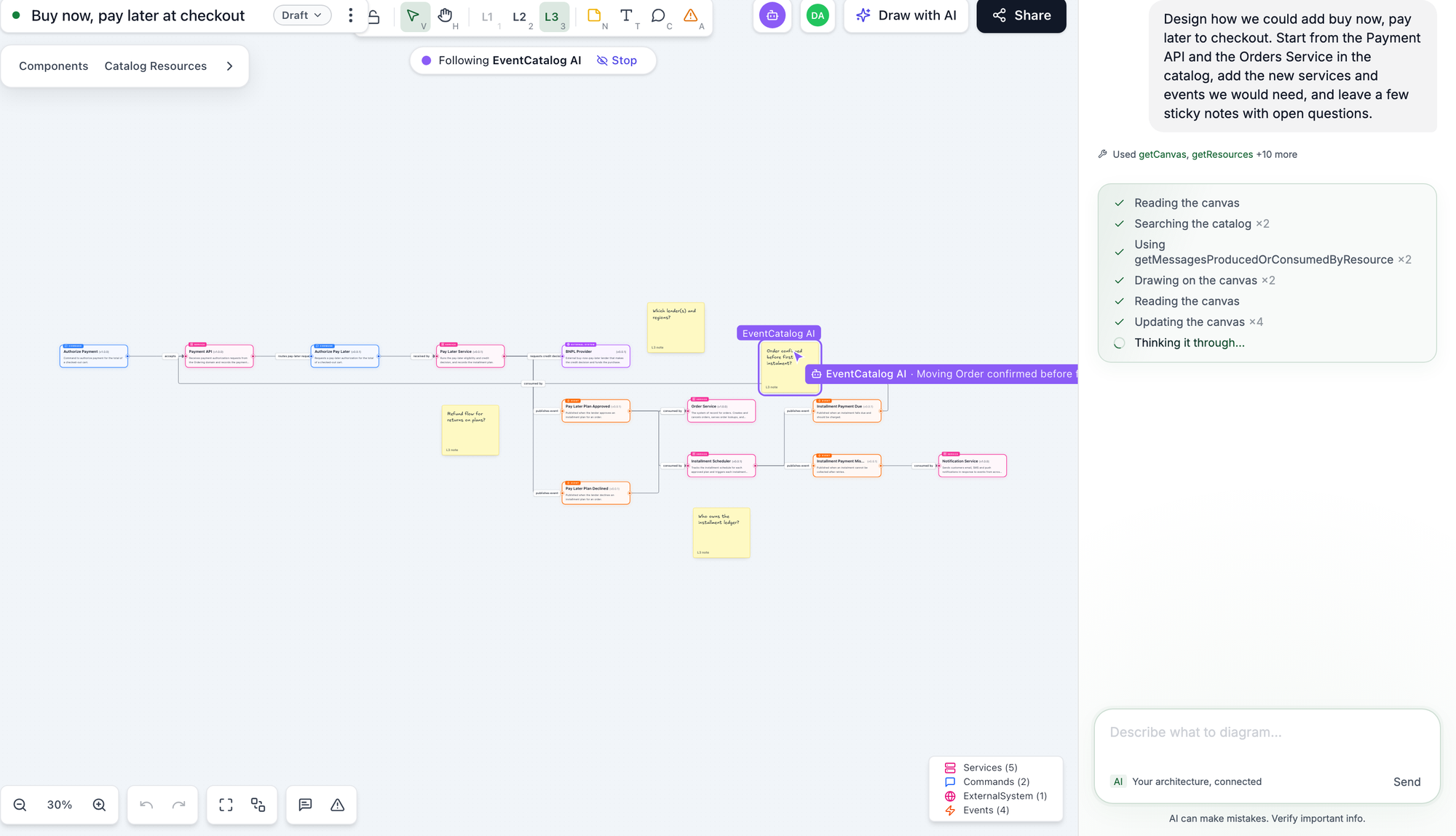
Asking the assistant to design buy now, pay later at checkout. Read the Draw with AI docs.
Studio also picked up an easier hotspot list, a grouped right-click menu, a resizable assistant panel (#3025), and you can now drag a connection onto empty canvas to add a connected node in one step (#3020).
Studio is on in eventcatalog dev, and you can turn it on in production. Start with Create a canvas.
Your diagrams inside your AI agent
Ask an AI tool how a service works and you normally get a wall of text, or a diagram the model has guessed.
In v5, the MCP server has a new showResource tool. In Claude, ChatGPT, VS Code and other tools that support MCP Apps, it shows your real EventCatalog diagrams and schemas right inside the conversation. You can switch levels, search, open other diagrams, and pick any node to ask a question about it. Clients without MCP Apps get Mermaid or the schema code instead.
Every MCP tool is now read-only, so clients can approve them automatically. Later in the month we moved the server to the MCP TypeScript SDK 2 (#2978), and made the schema and relationship tools return more accurate answers using about a fifth fewer tokens (#2997).
Read more in Your architecture diagrams, inside your agent.
Group flows by domain, system or team
Once a team has documented the steps of a flow, the next questions are almost always about ownership. Which teams are involved? Where does it cross into another domain?
In v5, you can group any flow by domain, system or team, drawn as boxes or swimlanes. Groups come from your catalog, so your flows don't need to change.

The Place an Order flow grouped by domain as lanes. Read the explore flows docs.
Flows also got a new step-by-step walkthrough, steps that can reference channels, and validation that tells you when a step is wrong. Read more in See who owns every step of a flow.
Share your architecture as one HTML file
Every now and then, someone asks for "a copy of the architecture". A partner, an auditor, a contractor still waiting for VPN access. Normally someone takes twenty screenshots and pastes them into a doc.
From 5.1, eventcatalog build writes an architecture reference, your whole catalog as one self-contained HTML file. Every domain, system, service, message and flow is linked to everything it relates to, with message attributes, example payloads and specifications.
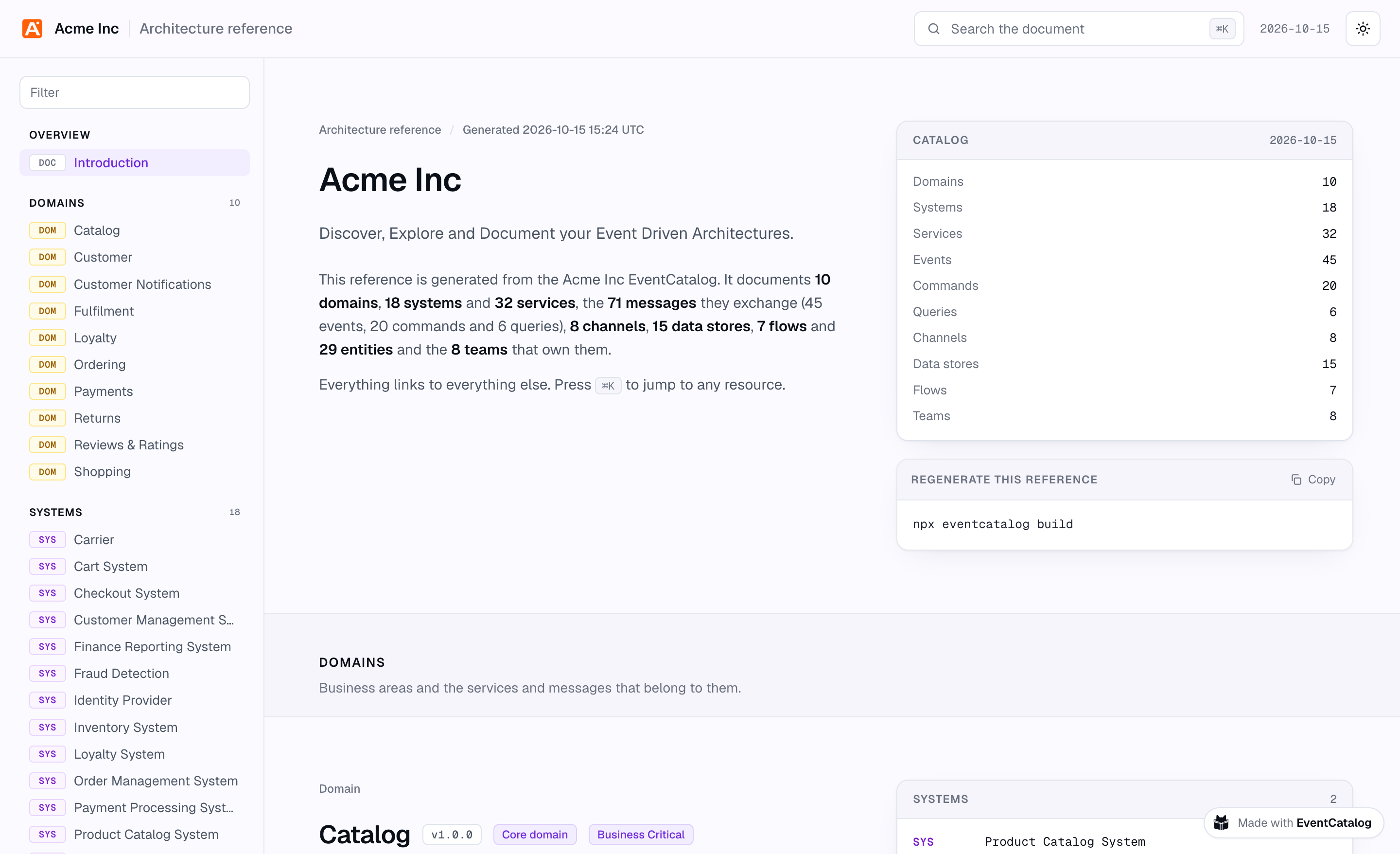
The architecture reference for our demo catalog. Open it for yourself.
In 5.2 we added custom exports, so you can share just the part of your catalog someone needs, by id or by a custom property such as x-public: true, with your own introduction at the top. Read more in Share your architecture with anyone.
Architecture fitness functions
Teams spend real time agreeing on how their architecture should look, but nothing checks that it still does.
In 5.4 we introduced architecture fitness functions. They are rules about your architecture, written in TypeScript, that read your catalog through the same methods as the EventCatalog SDK and return the resources that break them.
import { defineFitnessFunction } from '@eventcatalog/fitness';

export default defineFitnessFunction({
  id: 'event-ownership',
  name: 'Every event has an owner',
  severity: 'error',
  async run({ catalog }) {
    const events = await catalog.getEvents({ latestOnly: true });
    return events
      .filter((event) => !event.owners?.length)
      .map((event) => ({
        message: `${event.name} has no owners`,
        resources: [{ type: 'event', id: event.id, version: event.version }],
      }));
  },
});
You can keep rules at the root of your catalog, or next to the domain, system or service they are about. npx eventcatalog fitness check exits with code 1 when a rule fails, so you can run it in CI and stop a pull request that breaks a decision you made.
Read more in Introducing Architecture Fitness Functions for EventCatalog.
Attach any specification file
Not everything is OpenAPI or AsyncAPI. Many teams still have WSDLs, XML Schemas, or their own JSON and YAML contracts.
From 5.6, services, domains and messages can attach any specification file with type: generic.
specifications:
  - type: generic
    path: specs/carrier-shipping.wsdl
    name: Carrier Shipping API (WSDL)
    icon: /icons/soap.svg
Each file gets its own page, and shows up in the sidebar, the Schema Explorer, the visualiser, the MCP server and the HTML exporter. The Schema Explorer also now lists every format in your catalog, such as XML, YAML and GraphQL.
A big thank you to mc-world for the proposal and first implementation that this was built from (#3007).
Generators are now MIT licensed
As part of v5, every EventCatalog generator is now MIT licensed and no longer needs a licence key. That includes the OpenAPI, AsyncAPI, GraphQL, EventBridge, Amazon API Gateway, AWS Glue, Confluent Schema Registry, Azure Schema Registry, Apicurio and GitHub generators.
Upgrade your generators to the latest versions to pick this up. You can see every release on the generators repository.
Other project improvements
- Resource changelog pages now match the rest of the docs, with a Versions list to jump between releases (#3030)
- Fixed service changelog pages returning 404 in server mode, thanks to ugostack (#3030)
- Domain diagrams now draw a command or query, and its channel, in the domain that receives it (#3002, #3037)
- Fixed L1 domain diagrams drawing incorrect cross-domain dependencies through shared channels (#3029, #3033)
- An agent's tools are drawn only on its own diagram, and outside agents' tools stay outside a system's group (#3028, #3031, #3040)
- Fixed duplicate systems in the visualiser and edges that stopped short of their nodes (#2986, #2988)
- The EventCatalog Linter now resolves users and teams synced from directory sources in
refs/owner-exists(#3013, #3014) - The EventBridge generator updates existing services in place, instead of writing a duplicate copy of a service that lives inside a system (#3027)
- The assistant no longer jumps around while answers stream, makes room for itself on pages you navigate to, and updates its suggested questions for the current page (#3006, #3009, #3012)
<NodeGraph lanes="team" />on a flow page now opens the flow grouped (#3018)- The
hiddenfrontmatter field has been removed. Use a custom export to control what people outside your team see (#2973) - Fixed the "latest version" banner missing a space before the version, thanks to Quentin Vanmeerbeck (#2944), and the new version banner now names resources correctly (#2965)
- RSS feed builds on large catalogs dropped from about 25 minutes to tens of milliseconds on a catalog of about 2,000 files (4.12.2)
- Flow steps that reference a system now render as System nodes (4.12.3)
- Custom doc paths in the SDK are kept inside the catalog's docs directory (#2936)
- Updated dependencies with known vulnerabilities across core and the generators, and moved to patched Node releases (#3017, #3005)
Thanks
Thanks to everyone who contributed to EventCatalog this month by opening issues, reporting bugs, and suggesting features, including Dan Jackson, Jan Siekierski, mc-world, ugostack, Quentin Vanmeerbeck, Alex Dunne, and many more.
Shipping a major version is only half the work, and your reports in the weeks after v5 helped us make the new diagrams far more accurate.
If you have any questions or want to join our community exploring EventCatalog and event-driven architecture feel free to join us!
Until next time!, Dave