Custom exports
eventcatalog@5.2.0The architecture reference has your whole catalog in it, which is right for your own teams. For people outside them you usually want part of it: the services and events a partner integrates with, without the internal workers, databases and owners around them.
A custom export is that part of your catalog, written as a file in your catalog. Its frontmatter says what's in it, and its body is the introduction readers see first. Each one is written as its own HTML file, in the same format as the reference.
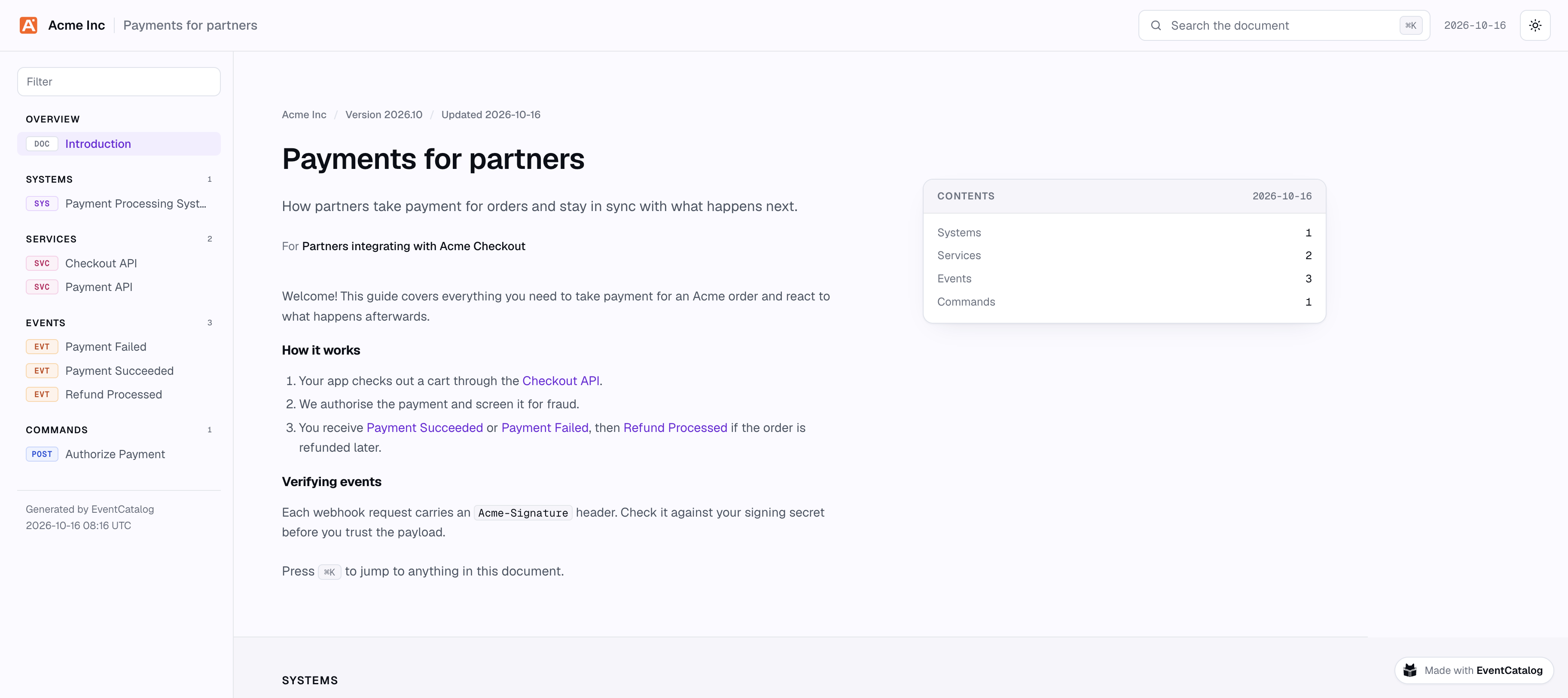
Some custom exports you might write:
- For partners: the services, events and specifications they integrate with.
- For a regulator or a data protection review: every resource that holds personal data.
- For the team taking over a domain: the whole domain, with its owners and docs.
- For the public: whatever your resources mark as public, with a custom property such as
x-public: true.
Create a custom export
Add a file to the exports folder at the root of your catalog. The file name is the export's id: exports/partner-payments.mdx is the export partner-payments, written to partner-payments.html.
---
title: Payments for partners
summary: How partners take payment for orders and stay in sync with what happens next.
audience: Partners integrating with Acme Checkout
version: 2026.10

include:
  # A whole system: its services, data stores and the messages they send and receive
  - system: payment-processing-system
  # One service, at the version partners integrate with
  - service: checkout-api
    version: 1.x
  # Single messages
  - event: payment-succeeded
  - event: payment-failed
  - event: refund-processed

exclude:
  # Internal, even though it's in the system above
  - service: payment-worker
  - data-store: payment-database
  # Anything holding personal data, by its custom property
  - x-contains-personal-data: true
---

Welcome! This guide covers everything you need to take payment for an Acme order and react to what happens afterwards.

## How it works

1. Your app checks out a cart through the [[service|checkout-api]].
2. You receive [[event|payment-succeeded]] or [[event|payment-failed]], then [[event|refund-processed]] if the order is refunded later.
title and include are required. summary, audience and version are shown at the top of the page. The body is markdown, and can link to resources with [[type|id]], as your other pages do.
See the reference for every field.
Choose what's in it
include and exclude are lists of selectors. A selector names one resource by its kind and id, or matches every resource with a custom property.
By id
include:
  - domain: payments
  - system: payment-processing-system
  - service: checkout-api
    version: 1.x # optional: an exact version or a range
  - event: payment-succeeded
  - message: refund-requested # an event, command or query with this id
Only the latest version of each resource is exported, so a version must match the latest one. If it doesn't, checking the export tells you which version is exported. See the reference for every kind you can select.
By custom property
Any selector with an x- field matches every resource with that custom property, instead of one resource:
include:
  # Every resource with x-public: true
  - x-public: true
  # Tier 1 services only
  - x-operational-tier: 1
    kind: service
  # Any of these values
  - x-data-classification: [public, partner]
exclude:
  - x-internal: true
- Every
x-field in a selector must match. Separate selectors are alternatives. - A field matches when the resource's value is one of those given. Values are compared as text, so
truematchestrueand"true". - When a resource's value is a list, it matches when any item in it does.
- Objects can't be matched.
kindnarrows the selector to one kind of resource, or a list of them (kind: [service, event]).
This lets resources opt in from their own frontmatter: mark what partners may see with x-public: true, and one selector picks it all up, including whatever you mark later.
The custom properties choose what's in an export, but they're never shown in it. Values like x-cost-centre stay in your catalog.
What include brings in
| You include | What goes in the export |
|---|---|
| A domain | The domain, its subdomains, systems, services, entities and flows, all the way down, and the messages its services send and receive |
| A system | The system, its services, data stores, entities and flows, and the messages its services send and receive |
| Anything else | That resource |
A service on its own doesn't bring its messages. Include them, include the system the service is in, or set references: include.
Exclude
exclude is applied first and always wins over include.
- A resource you exclude isn't added, even when it's inside something you included.
- Excluding a domain or system takes out everything in it.
- An excluded resource brings nothing with it. The messages only an excluded service sends and receives aren't pulled in through it.
- An excluded resource is never named. Links to it are dropped, whatever
referencesis set to, and links to it in docs read "another service".
Never export
neverExport in eventcatalog.config.js works like an exclude in every custom export. Use it for what must never leave your catalog, whatever an export includes. It takes the same selectors, by id or by custom property:
module.exports = {
  exports: {
    custom: {
      neverExport: [
        { service: 'fraud-detection' },
        { 'x-data-classification': ['confidential', 'restricted'] },
      ],
    },
  },
};
Links to resources outside the export
Resources in the export still point at things that aren't in it, like a service that consumes one of your events. references sets what readers see:
omit(the default): nothing. The link is dropped.name-only: the resource's name, without a link.include: the resource itself, pulled into the export. One level only, so what it points at isn't followed. Excluded resources are never pulled in.
Hidden fields
Some fields are written for your own teams. By default, an export leaves out the owners, repositories, team contacts and the resources' own docs. Set hide to choose:
hide: [owners, repository] # show contacts and docs
Set hide: [] to show everything, for example in an export for one of your own teams. See the reference for every field you can hide.
The resources' docs are hidden by default because they're often full of what's around them. If you show them, links in them to resources outside the export read "another service", "another event" and so on (or the resource's name, with references: name-only, unless it was excluded).
The order things happen in
excludeandneverExporttake resources out, with everything inside them.includeadds what it names (a domain or system with what's inside it), skipping anything taken out.references: includeadds what those resources point at, one level.- Links to anything outside the export are dropped, or shown as names with
references: name-only. hideleaves fields out of what's left.
Check a custom export
Before you share a custom export, check what's in it, what was left out, and why:
npx @eventcatalog/cli export partner-payments --check
  Payments for partners (exports/partner-payments.mdx)

  Included (7)
    system   payment-processing-system 1.0.0  (include)
    service  payment-api 1.0.0                (in system payment-processing-system)
    command  authorize-payment 1.0.0          (in system payment-processing-system)
    service  checkout-api 1.0.0               (include)
    event    payment-succeeded 1.0.0          (include)
    event    payment-failed 1.0.0             (include)
    event    refund-processed 1.0.0           (include)

  Excluded (2)
    service     payment-worker 1.0.0    (exclude, was in system payment-processing-system)
    data store  payment-database 1.0.0  (exclude, was in system payment-processing-system)

  Links dropped (26)
    system payment-processing-system  →  domain payments  (not in this export)
    ...

  Hidden: owners, repository, contacts, docs
Resources matched by a custom property say so, for example (include service with x-operational-tier: 1).
--check fails when a selector in include or exclude matches nothing in the catalog, so run it in CI to notice when a resource is renamed or removed.
Export it
Every time you build your catalog, EventCatalog writes each custom export to dist/exports/<id>.html (dist/client/exports/<id>.html in server mode). Wherever you host your catalog, it's at /exports/<id>.html.
Each one is written on its own: a custom export with a problem is skipped with a warning in the build's output, and the others are still written. Run --check on it to see what's wrong.
To export one without building the catalog, use the CLI:
npx @eventcatalog/cli export partner-payments
This writes partner-payments.html and opens it in your browser. See the reference for the CLI's options.
Configure custom exports
Set options for every custom export in eventcatalog.config.js, under exports.custom:
module.exports = {
  exports: {
    custom: {
      // Build only these custom exports (by id)
      only: ['partner-payments'],
      // What every custom export starts from. Its own frontmatter overrides it.
      defaults: {
        hide: ['owners', 'repository', 'contacts', 'docs'],
        references: 'omit',
      },
      // Never in any custom export, whatever it includes
      neverExport: [{ 'x-data-classification': ['confidential', 'restricted'] }],
    },
  },
};
To stop writing custom exports when you build, set exports.custom.enabled to false.
If your catalog uses authentication, custom exports aren't written when you build unless you set exports.custom.enabled to true. You can still export them with the CLI.
See the reference for every option.