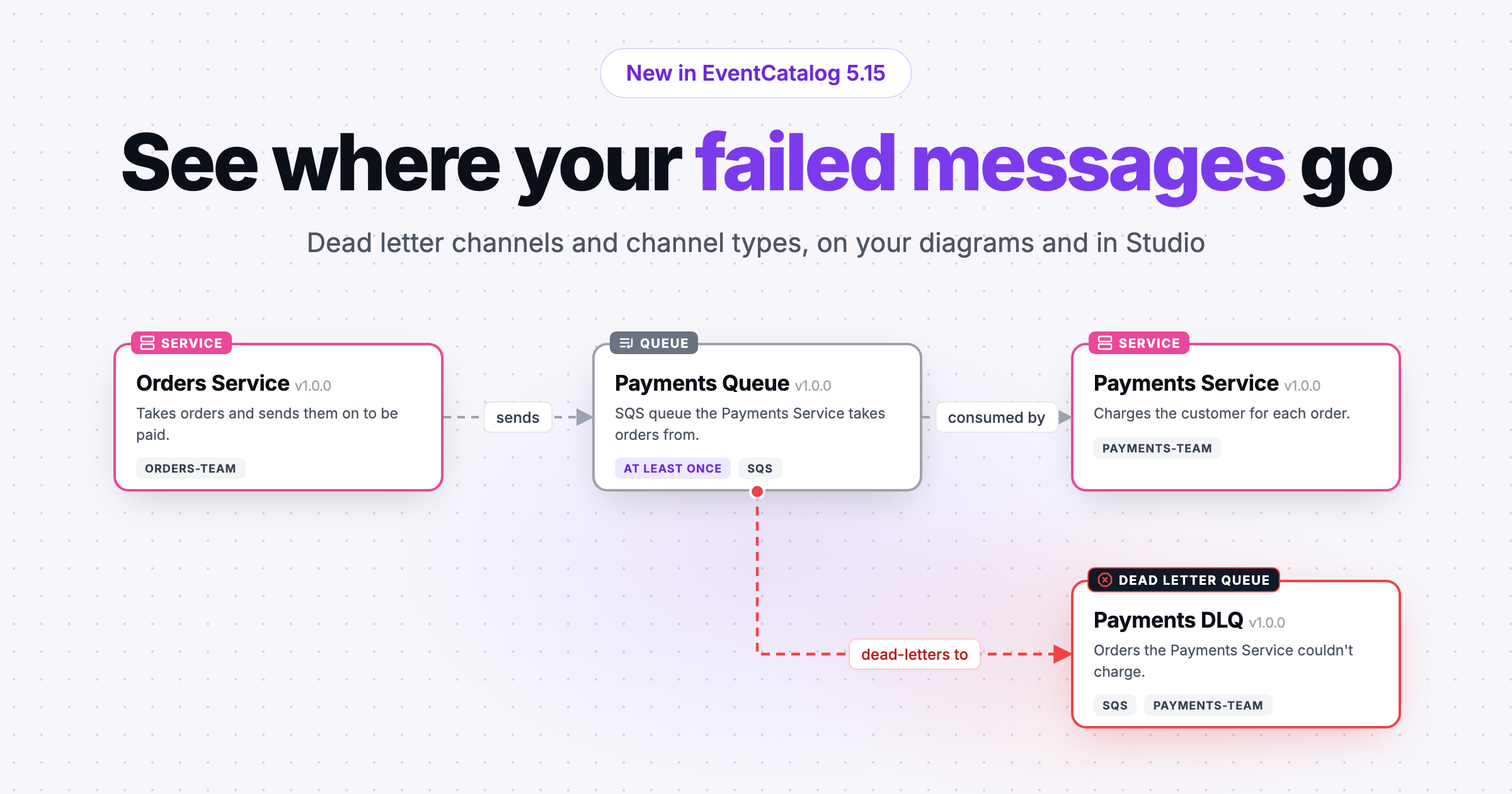
Channels can now point to their dead letter channel and declare their type (queue, topic or stream). Diagrams, the sidebar, the linter and Studio all understand both.
When a message can't be delivered or processed, where does it go? In most architectures the answer lives in an SQS redrive policy, a RabbitMQ dead letter exchange or somebody's head, and you find out which when something breaks at 2am.
Channels in EventCatalog can now point to their dead letter channel, and say whether they are a queue, a topic or a stream. Both are in EventCatalog 5.15.
The failure path was invisible
Your catalog already documents the happy path: a service publishes an event, a channel carries it, another service consumes it. The failure path is just as real, but it was nowhere on the diagram. Who owns the DLQ? What is the runbook for redriving it? Which channels share it?
Channels also all looked the same. An SQS queue (one consumer gets each message), an SNS topic (every subscription gets a copy) and a Kafka topic (an ordered log read at each consumer's own offset) behave very differently, but the card gave no hint.
Dead letter channels and channel types
Add deadLetterChannel to the channel the messages come from:
# channels/orders.queue/index.mdx
---
id: orders.queue
type: queue
deadLetterChannel:
  id: orders.queue.dlq
  version: 1.0.0 # optional, latest if left out
---
The name follows the Enterprise Integration Patterns Dead Letter Channel, because it isn't always a queue: it can be a Pub/Sub dead-letter topic or a Kafka dead letter topic. The dead letter channel is an ordinary channel with its own docs, owners and runbook. You don't flag it. It is a dead letter channel because another channel points to it (only the latest version of the source counts). A channel has one, and several channels can share one.
type takes queue, topic or stream. A Kafka topic is a stream.
When you'd use it
If you run SQS with redrive policies, RabbitMQ with dead letter exchanges, Pub/Sub with dead-letter topics or Kafka with dead letter topics, this puts the failure path next to the happy path. It helps in incident reviews ("which queue did these end up in, and who owns it?") and when someone new is finding their way around a system.
How it works
On a channel diagram, the dead letter channel gets a red border and a dark Dead Letter Queue badge with a stop-sign icon (Dead Letter Topic, Dead Letter Stream or Dead Letter Channel for other types). A dashed red "dead-letters to" edge leaves the bottom of the source channel and turns right into it, below the consumers. This is the L shape from the Enterprise Integration Patterns diagram.
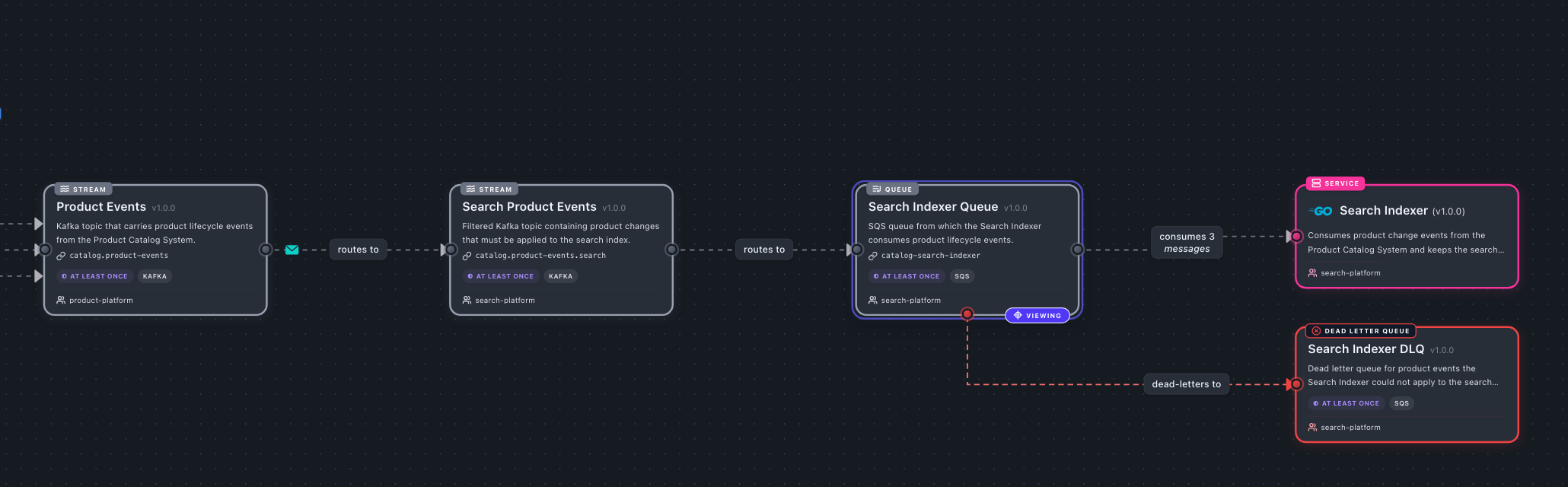
Search Indexer Queue dead-letters to Search Indexer DLQ. Every channel on a channel diagram shows its dead letter channel.
Channel types keep the card grey but add the type's icon and label: a list icon for Queue, a radio tower for Topic and waves for Stream. A typed dead letter queue reads "Dead Letter Queue".
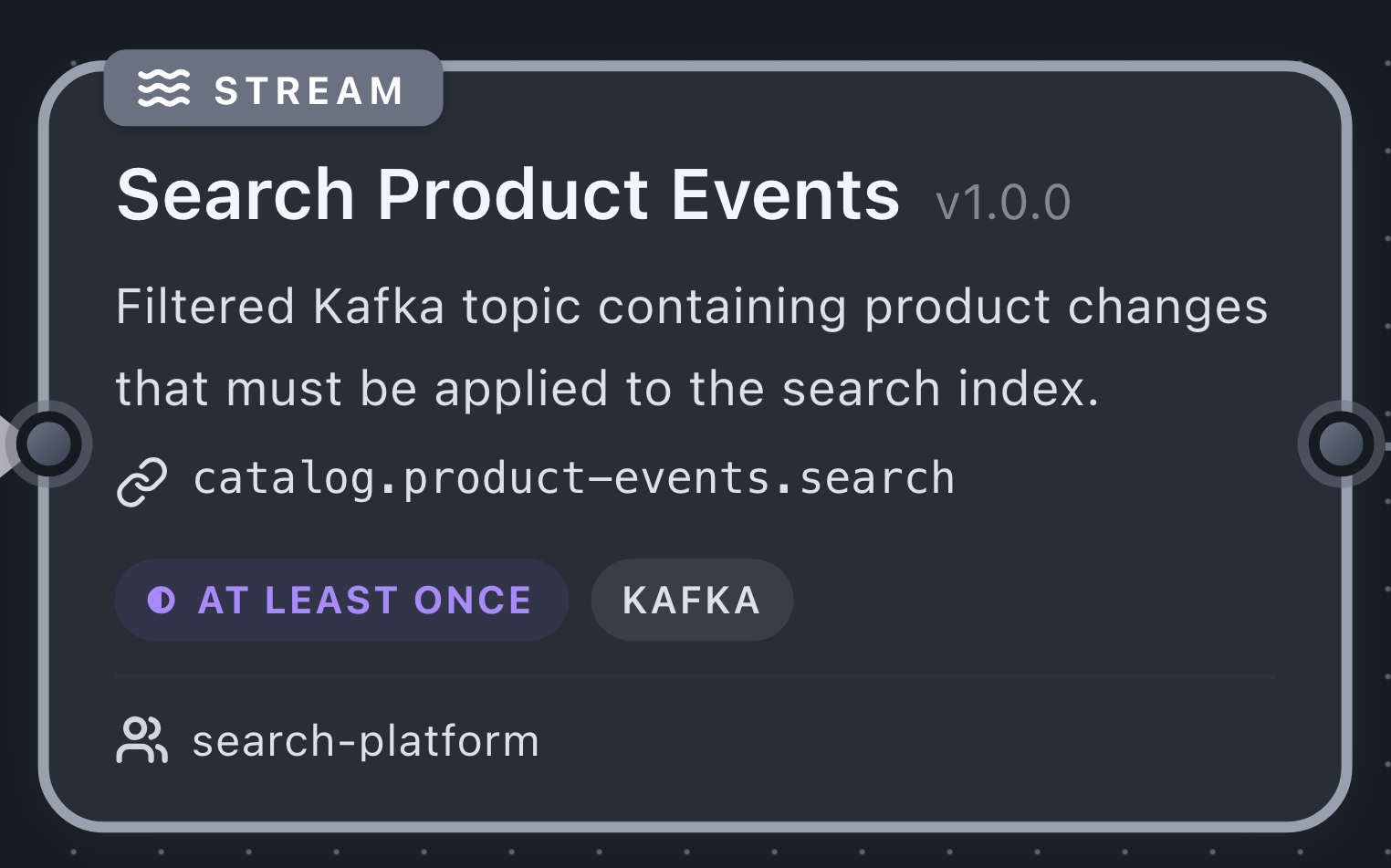
The edge doesn't animate with Simulate messages, since a steady flow into a DLQ would look like constant failure. The sidebar gives the source channel a Dead Letter Channel section, and the dead letter channel a Dead Letters From section and the stop-sign icon.

The <ChannelInformation /> component shows "Dead letter channel: Name (vX)" and "Dead letters from: ...". The linter reports a deadLetterChannel that points to a channel that doesn't exist. Federation carries it too, so a dead letter channel in another catalog resolves, and a missing one is reported.
Set them in Studio
Studio (in EventCatalog and Studio on the web) supports both. A channel's card has a Type picker (None, Queue, Topic, Stream) and a Dead letter channel checkbox.
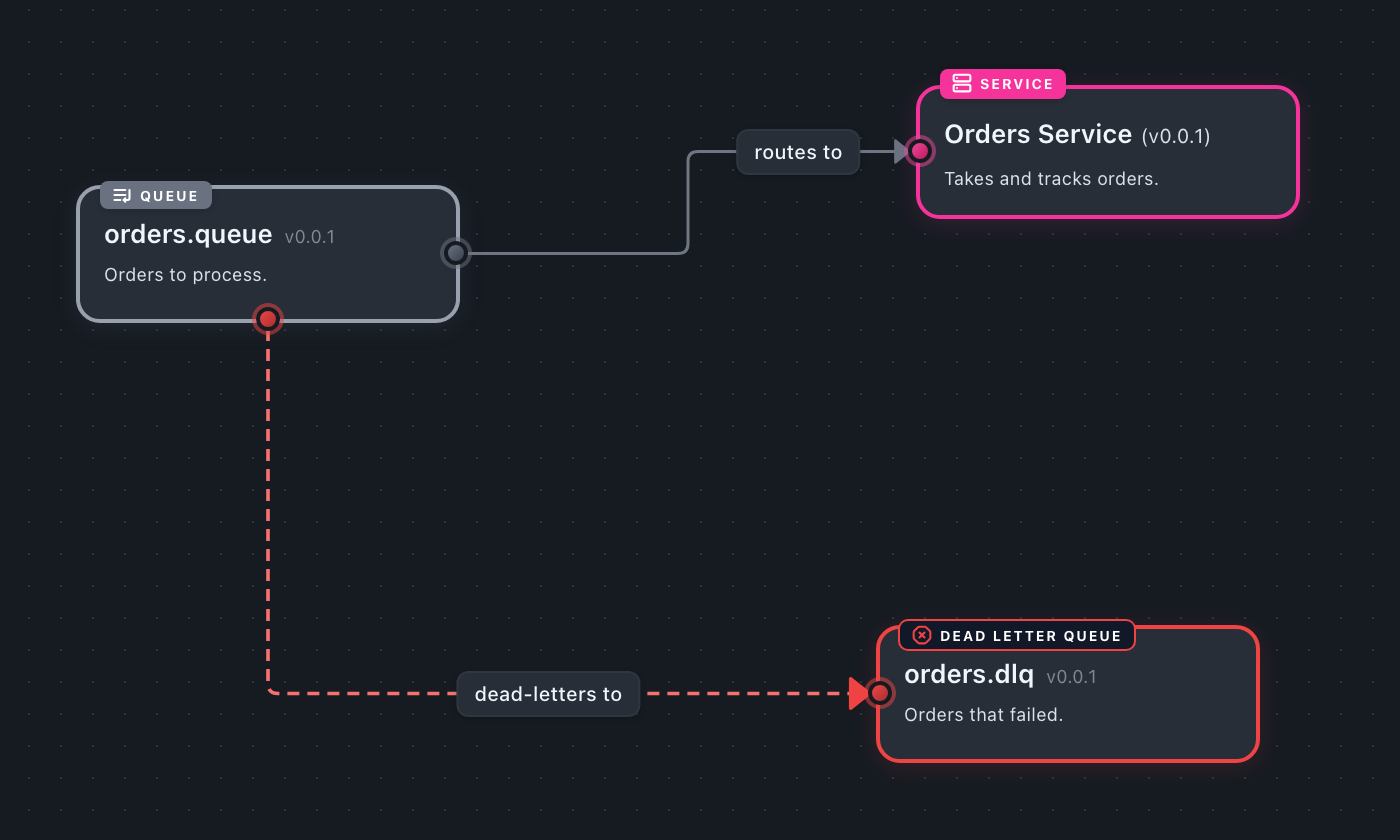
Drag a connection from a channel's bottom handle to another channel and Studio draws a "dead-letters to" edge and marks the target as a dead letter channel.
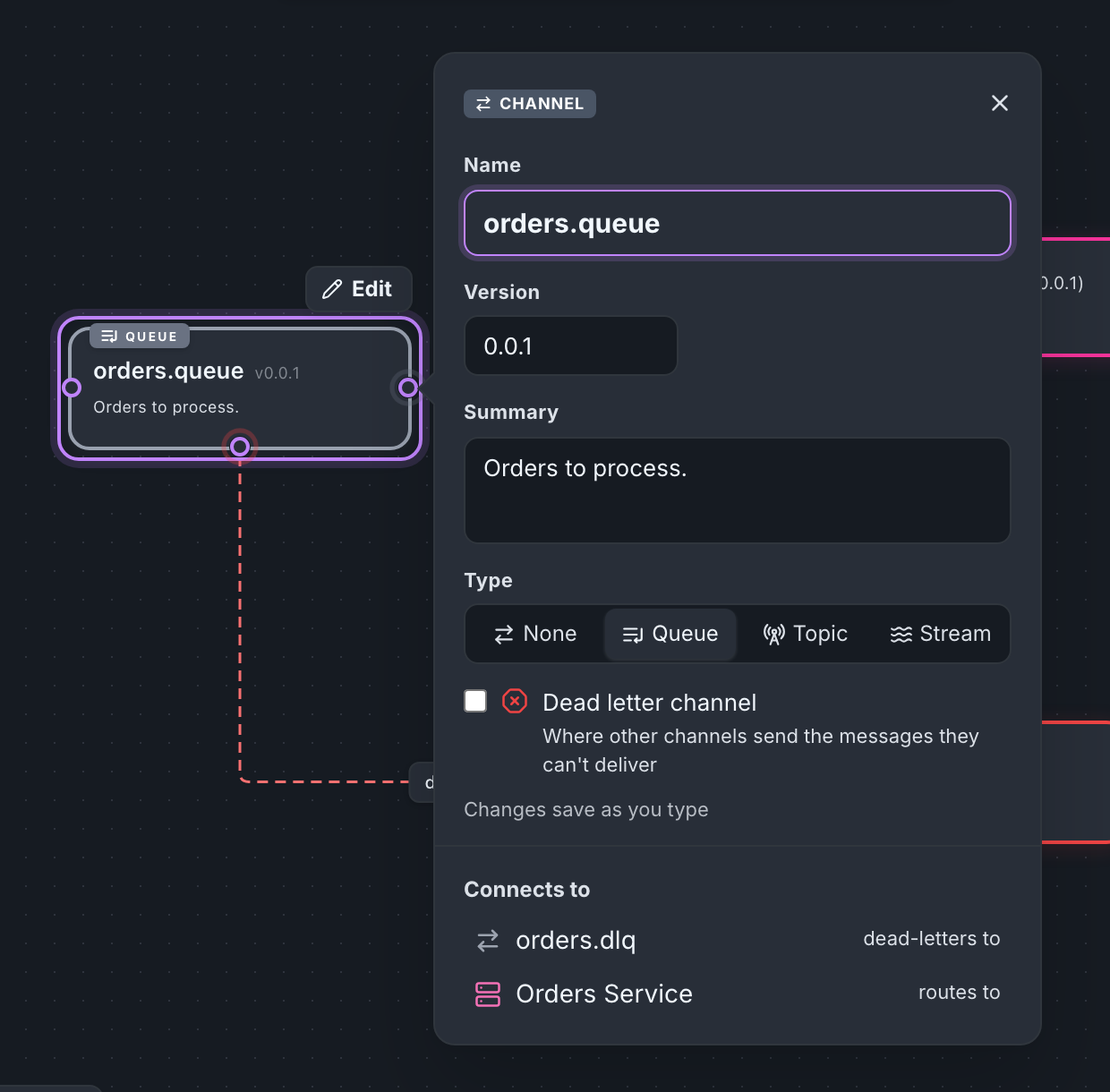
Agents can do the same. Studio's add_to_canvas and update_node MCP tools take channelType and deadLetter, and the model in Studio on the web has the same two fields, so "add a DLQ to the orders queue" works when you draw with AI.
Getting started
Upgrade, then add type and deadLetterChannel to a channel's frontmatter:
npm install @eventcatalog/core@latest
Document the dead letter channel as a normal channel (owners, summary, runbook), then open the source channel's diagram at http://localhost:3000/visualiser/channels/orders.queue/1.0.0. The guides cover setting the type of a channel and documenting a dead letter channel.
Two smaller fixes shipped alongside: message diagrams no longer repeat channel cards, and Simulate messages on a channel diagram now animates producer and consumer edges too.
Summary
Channels can declare a type and a deadLetterChannel. Diagrams, the sidebar, <ChannelInformation />, the linter, federation and Studio all use them. The full field details are in the channel reference.
Questions or ideas? Join us on Discord or open an issue on GitHub.