EventCatalog 4.12 turns every schema into a page consumers can work from, with written examples, producers and consumers, flows, and version comparison. It also removes the .eventcatalog-core folder from your project.
When someone opens a schema in your catalog, they rarely stop at the schema.
They want to know how to publish the message. Who else is consuming it. Which business flow it is part of. What changed since the version they integrated against.
Until now, most of those answers lived somewhere else in the catalog, or in someone's head.
EventCatalog 4.12 turns every schema into a page your consumers can work from.
This release (along with 4.11, which shipped the first part of this work) brings:
- A richer schema page: tabs for examples, producers and consumers, flows, versions, and details, all linkable.
- Written usage examples: explain how to use a message, with code in several languages, right next to the schema.
- Two new components:
<Columns />and<CodeGroup />, for any page in your catalog. - No more
.eventcatalog-corefolder: EventCatalog now runs directly inside your project. - Custom pages that match the rest of your catalog, and the assistant upgraded to AI SDK v7.
A schema page that answers the next question
The Schema Explorer has always been a good place to find a schema. In 4.12, it is also the place to understand one.
Every schema is now split into tabs:
- Schema and Properties for the contract itself
- Examples for how to use it
- Producers & Consumers and Flows for where it is used
- Versions, Details, and API for reference
Tabs only appear when there is something to show. If a message is not part of a flow, you will not see an empty Flows tab.
Every tab is also linkable. The selected tab is kept in the URL, so you can send a teammate straight to the examples for a message:
/schemas/events/OrderCreated/1.0.0?tab=examples
This sounds small, but it changes how people share schemas. Instead of "open OrderCreated, then click the third tab", you paste one link into Slack or a pull request.
Write examples your consumers can actually use
A JSON payload shows the shape of a message. It does not tell you when to publish it, which fields matter, or how to call it from your language.
In 4.12, you can write usage examples in Markdown or MDX. Add an examples/ folder next to your message, drop in an index.mdx, and EventCatalog renders it in the Examples tab.
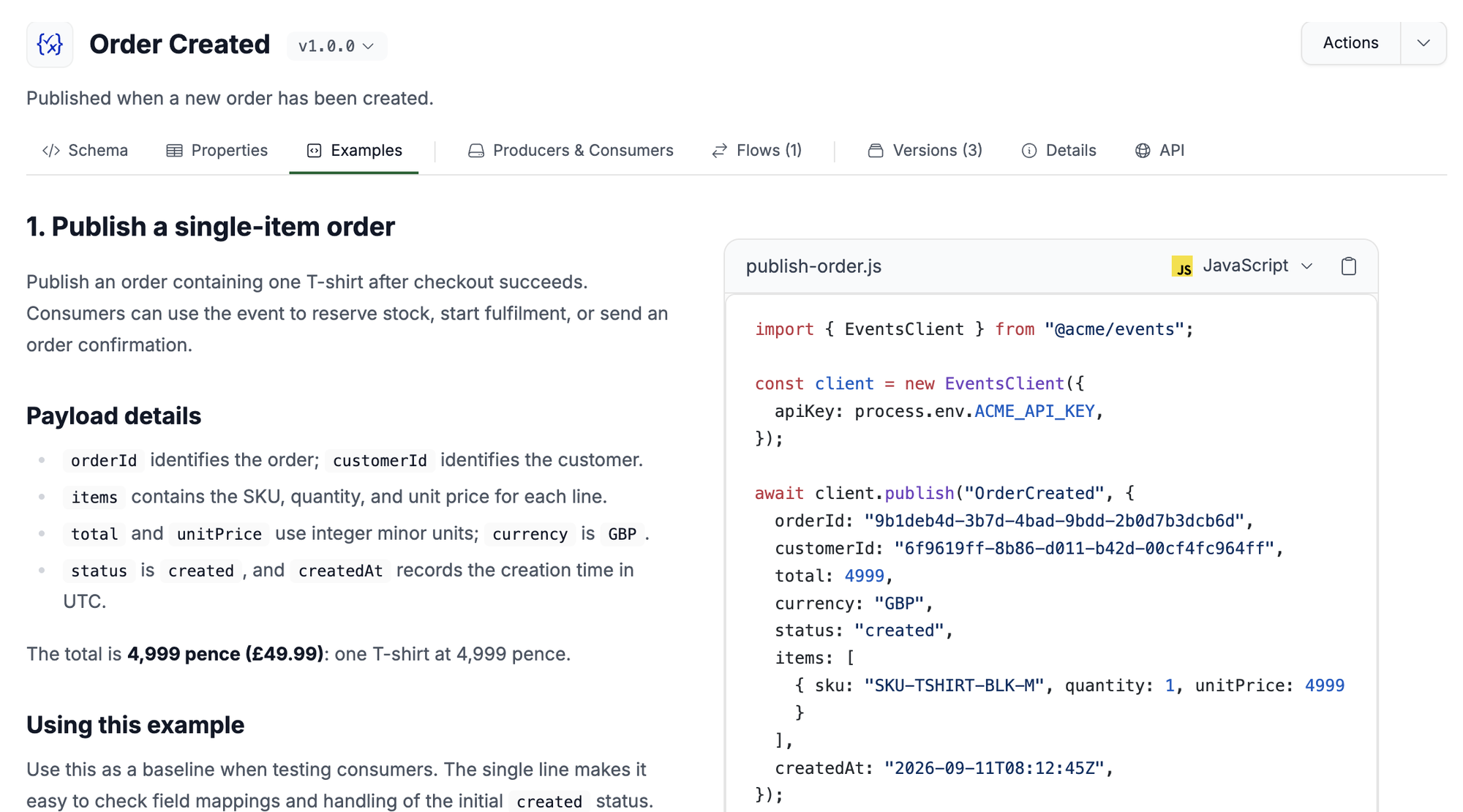
The Examples tab for OrderCreated, from the default EventCatalog example catalog. Read how to add usage examples.
Here is what that example looks like in MDX:
<Columns cols={2}>

<Column>

## Publish a single-item order

Publish an order containing one T-shirt after checkout succeeds.
Consumers can use the event to reserve stock, start fulfilment,
or send an order confirmation.

</Column>

<Column>

<CodeGroup dropdown>

```javascript publish-order.js
await client.publish("OrderCreated", {
  orderId: "9b1deb4d-3b7d-4bad-9bdd-2b0d7b3dcb6d",
  total: 4999,
  currency: "GBP",
});
```

```python publish_order.py
client.publish("OrderCreated", {
    "orderId": "9b1deb4d-3b7d-4bad-9bdd-2b0d7b3dcb6d",
    "total": 4999,
    "currency": "GBP",
})
```

</CodeGroup>

</Column>

</Columns>
The team that owns the message writes the examples once, next to the schema. Every consumer gets the same answer, in their own language, without asking in a channel.
Your existing examples keep working. JSON, YAML, XML, and other files in examples/ still show up in the same tab.
Two new components: Columns and CodeGroup
The layout above uses two new components. You can use them in examples, and on any other page in your catalog.
<Columns /> places content side by side. Put the explanation on the left and the code on the right, set the widths with a ratio, and make a column sticky so the code stays in view while the reader scrolls.
<CodeGroup /> groups code blocks into tabs, or a dropdown when you have more than a few. Each block gets a language icon. When a reader picks Python in one group, every other group on the page with a Python block switches too.

These work well on service pages too, for example to show how to call an API from different clients.
See who uses a schema, and where
Before you change a schema, you need to know who you will affect.
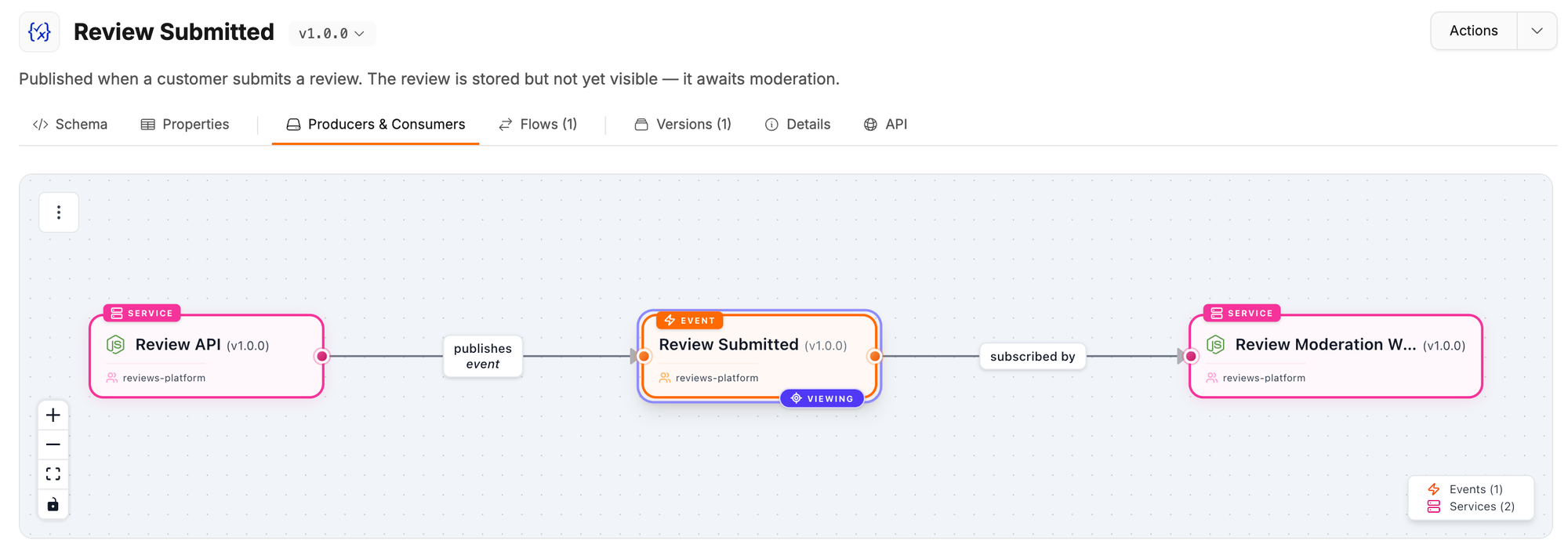
The Producers & Consumers tab now shows the same graph you see on the message page, so you can see every service that publishes or subscribes to the message without leaving the schema.
The Flows tab shows the flows the message is part of. If it appears in more than one flow, pick the one you care about, or jump to the full flow page.
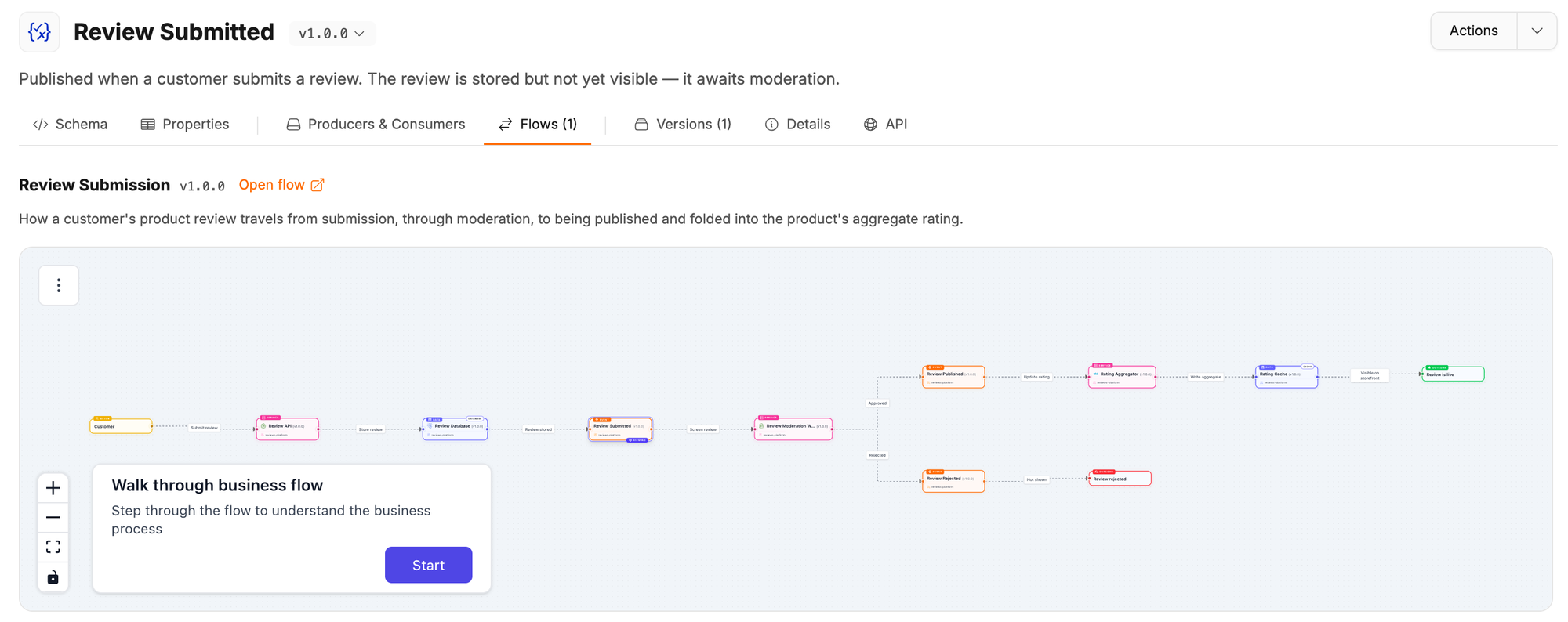
This is the context that makes a schema make sense. ReviewSubmitted is a small payload. Seeing that it kicks off moderation, and ends with the product rating being updated, tells you far more about what a breaking change would do.
Compare versions and see where a schema came from
The Versions tab lists every version of a schema. Pick a From and To version to compare them side by side, or expand the comparison to review a bigger change.
The Details tab brings the schema metadata into one place: format, message type, version, file, source, and owners.
EventCatalog now runs inside your project
This one is under the hood, but you will notice it.
Before 4.12, every time you ran eventcatalog dev or eventcatalog build, EventCatalog copied itself into a .eventcatalog-core/ folder in your project and ran from there. It worked, but it caused a lot of "delete .eventcatalog-core and try again" moments, especially after upgrades.
In 4.12, that copy is gone. EventCatalog reads your content and customizations directly from your project, and keeps generated files in the standard .astro/ folder.
What this means for you:
- No more
.eventcatalog-core/folder. Once your older EventCatalog processes have stopped, you can delete it.eventcatalog devandeventcatalog buildwill tell you when it is safe to do so. - One cache to clear. If the dev server shows stale content,
npx eventcatalog dev --force-recreatenow resets the whole.astro/folder. See clear the development cache. - Custom components share EventCatalog's React. Even if your project installs its own React, your custom components use the same React instance as EventCatalog.
- Faster edits to your homepage. Changes to a custom homepage now hot reload instead of restarting the dev server.
Keep .astro/ in your .gitignore and .dockerignore. New catalogs created with create-eventcatalog already include it.
Custom pages that match the rest of your catalog
Custom pages built with @catalog/layouts/Layout.astro now get the same page padding and theme text color as built-in pages. They look right in dark mode without any extra work.
If your page needs the full width, for example a dashboard, pass fullWidth:
---
import Layout from '@catalog/layouts/Layout.astro';
---

<Layout title="Dashboard" fullWidth>
  <!-- Your full-width content -->
</Layout>
Documentation pages also have less padding around them, so your content has more room on laptops and desktops.
EventCatalog Assistant on AI SDK v7
The EventCatalog Assistant now uses AI SDK v7.
If you use the assistant, install a provider package that supports AI SDK v7, for example @ai-sdk/openai@^4. If you have custom tools that use AI SDK v6 APIs, update them to the v7 equivalents.
Other improvements
- JSON Schema
oneOfandanyOfoptions now show properties declared on the parent schema (#2888) - Static builds no longer crash when a message graph references a channel that is missing from the catalog (#2886)
- The update banner only shows when a newer version exists, and no longer suggests a downgrade (#2894)
- Quieter builds: no more empty content collection warnings for collections you do not use, or harmless
astro:head-injectwarnings (#2896, #2903) - Fixed the visualiser and assistant failing to load in installed catalogs during development (#2908, #2910)
- Test files are no longer shipped in the published package (#2893)
- Upgraded Astro to 7.3.3 (#2889)
Upgrade to 4.12
Run this in your catalog:
npm install @eventcatalog/core@latest
Then:
- Stop any running EventCatalog processes and delete the
.eventcatalog-core/folder. - Make sure
.astro/is in your.gitignoreand.dockerignore. - If you use the assistant, update your AI SDK provider package.
For more help, see upgrading EventCatalog.
Summary
A schema is a contract, and people need more than the contract to use it well.
EventCatalog 4.12 puts the examples, the producers and consumers, the flows, and the history on the same page as the schema. Your consumers get answers without asking, and your producers can see who they will affect before they change anything.
Add an examples/index.mdx to one of your most used messages and see how it feels. Start with add usage examples.
If you have feedback, join us on Discord. If you find a bug or want to contribute, open an issue or pull request on GitHub.