Set up Breaking Changes with Bitbucket
Run Breaking Changes in Bitbucket Pipelines on your Bitbucket Cloud pull requests. New to Breaking Changes? Read the introduction first.
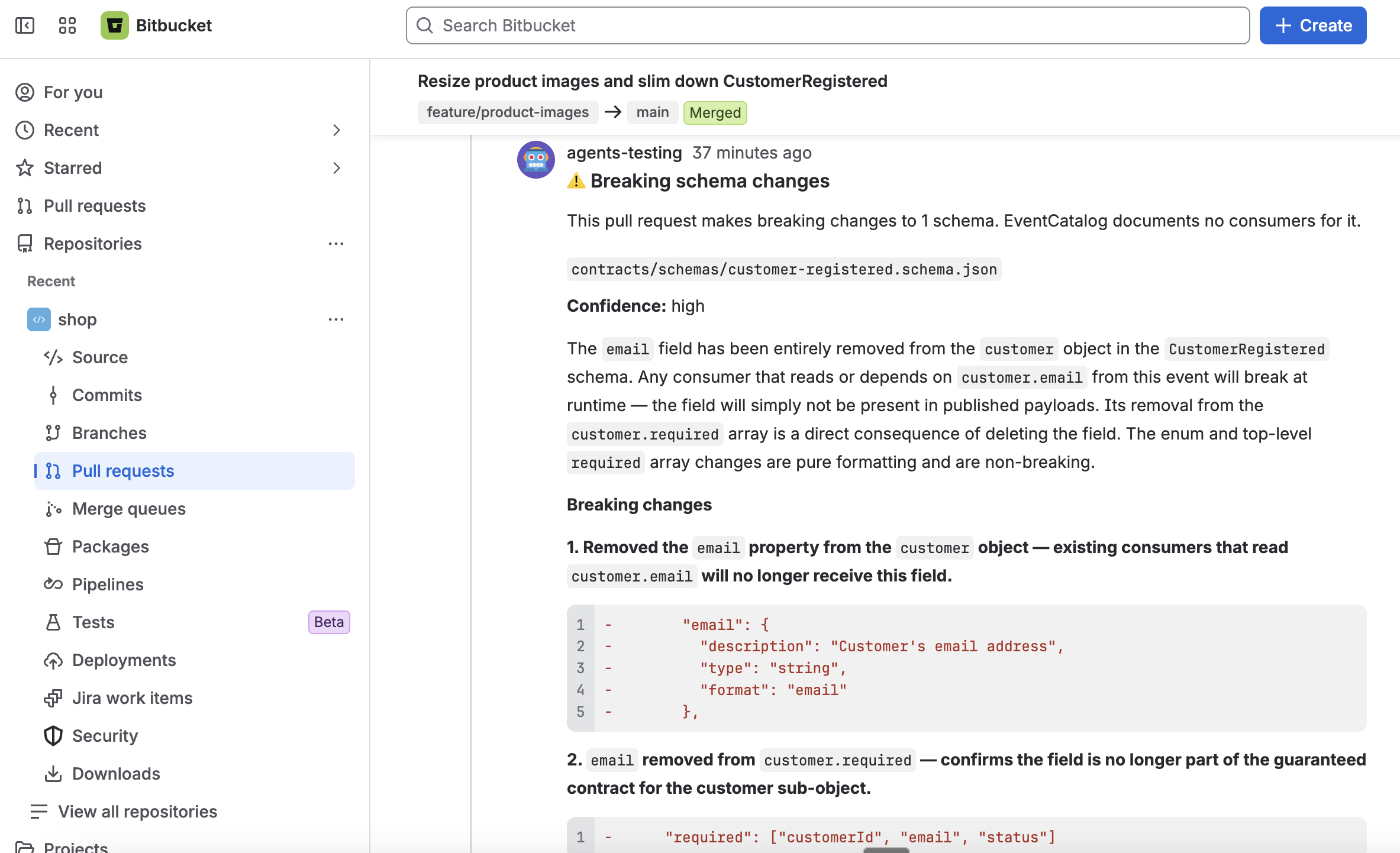
A pull request pipeline runs the agent on every push to the pull request. When the change would break a consumer documented in your catalog, it comments on the pull request, so reviewers see it before the change merges:
Before you start
You need:
- A Bitbucket Cloud repository with your source code (the source repository), with Pipelines turned on (Repository settings → Pipelines → Settings). Bitbucket only lets you turn on Pipelines once you've set up Bitbucket two-step verification, which is separate from your Atlassian account's and needs an SSH key on your account first.
- An EventCatalog in a Bitbucket repository (the catalog repository), with the catalog at the root of the repository, and the consumers of your messages documented in it. Or keep it on GitHub.
- An API key for an AI model provider.
Setup
1. Create the access tokens
Bitbucket Pipelines has no built-in token for the REST API, so the agent uses repository access tokens. In each repository, open Repository settings → Security → Access tokens, and create a token with these permissions:
| Repository | Permissions |
|---|---|
| Source repository | Repositories: Read and Pull requests: Write, to comment |
| Catalog repository | Repositories: Read. The workflow never writes to it. |
Comments appear under the source token's name, so name it something like EventCatalog Agents. If your plan has project or workspace access tokens, one token with these permissions on both repositories works too.
2. Add the repository variables
In the source repository, open Repository settings → Pipelines → Repository variables, and add these as secured variables:
| Variable | Value |
|---|---|
EVENTCATALOG_BITBUCKET_TOKEN | The source repository's access token. |
EVENTCATALOG_CATALOG_TOKEN | The catalog repository's access token. Leave it out if the source token can read the catalog. |
ANTHROPIC_API_KEY | Your model provider key (see models). |
Secured variables are hidden in the logs. To share them across repositories, add them as workspace variables instead.
3. Add the pipeline
Add a pull request pipeline to bitbucket-pipelines.yml in your source repository. If you already have the file, add the step under your own pipelines section.
pipelines:
  pull-requests:
    '**': # every pull request
      - step:
          name: EventCatalog Breaking Changes
          image: node:24
          clone:
            depth: full
          script:
            - git clone --quiet --depth 1 --branch v2 https://github.com/event-catalog/agents.git /tmp/eventcatalog-agents
            - /tmp/eventcatalog-agents/bitbucket-pipelines/run.sh breaking-changes --catalog-repo acme/eventcatalog --catalog-url https://catalog.example.com
Replace acme/eventcatalog with your catalog repository, as workspace/repo. --catalog-url is optional: it links consumers and owners to your hosted catalog.
- Keep
clone: depth: full. The agent needs the history to compare the pull request with its target branch, and Bitbucket clones only the last 50 commits by default. - Keep
image: node:24, or use another image with Node.js 22.19 or later and git.
4. Check it works
Open a pull request that removes a field from a schema that a service in your catalog consumes. The agent comments on the pull request. Each push updates the same comment.
Run it with Code-to-Docs
If you also sync docs with your code, run Breaking Changes on pull requests and Code-to-Docs once they merge, from the same file:
pipelines:
  pull-requests:
    '**':
      - step:
          name: EventCatalog Breaking Changes
          image: node:24
          clone:
            depth: full
          script:
            - git clone --quiet --depth 1 --branch v2 https://github.com/event-catalog/agents.git /tmp/eventcatalog-agents
            - /tmp/eventcatalog-agents/bitbucket-pipelines/run.sh breaking-changes --catalog-repo acme/eventcatalog
  branches:
    main: # runs once a pull request merges into main
      - step:
          name: EventCatalog Code-to-Docs
          image: node:24
          clone:
            depth: full
          script:
            - git clone --quiet --depth 1 --branch v2 https://github.com/event-catalog/agents.git /tmp/eventcatalog-agents
            - /tmp/eventcatalog-agents/bitbucket-pipelines/run.sh code-to-docs --catalog-repo acme/eventcatalog
Code-to-Docs needs more access to the catalog repository: see its tokens.
Options
The first argument is the workflow. The options follow it:
| Option | Required | Default | Description |
|---|---|---|---|
breaking-changes | Yes | The workflow to run. | |
--catalog-repo | Yes | Your catalog repository: workspace/repo (or repo in the same workspace), or its URL. owner/repo for GitHub. | |
--catalog-ref | No | main | The catalog branch to read. |
--catalog-provider | No | bitbucket | Where your catalog is hosted: bitbucket or github. |
--catalog-url | No | The URL of your hosted catalog. The comment links consumers and owners to it. | |
--model | No | anthropic/claude-sonnet-4-6 | The model the agent uses. See models. |
--schema-extensions | No | .json,.yml,.yaml,.avro,.avsc,.proto,.graphql,.gql | The file extensions treated as message schemas. See which files are checked. |
--ignore-paths | No | Build and dependency folders | Comma-separated paths or glob patterns to leave out of the review. |
--source-dir | No | $BITBUCKET_CLONE_DIR | The source checkout to compare. |
To pin an exact release, change --branch v2 in the git clone line to a release such as --branch v2.4.0.
Use a catalog on GitHub
To keep your catalog on GitHub with your code in Bitbucket, add --catalog-provider github, set --catalog-repo to owner/repo, and set EVENTCATALOG_CATALOG_TOKEN to a GitHub token that can read the catalog repository. A fine-grained token needs only Contents: Read.
Differences from GitHub
- Bitbucket has no built-in token, so you create access tokens for the agent and add them as secured variables.
- Impact diagrams show as Mermaid source. Bitbucket doesn't render Mermaid in pull requests.
Troubleshooting
| Message | What to do |
|---|---|
Cannot find the commits to compare | Set clone: depth: full on the step. |
Bitbucket needs an access token to comment on pull requests | Add the EVENTCATALOG_BITBUCKET_TOKEN secured variable. |
Could not fetch branch … | Give the catalog token Repositories: Read on the catalog repository, and check --catalog-repo and --catalog-ref. |
failed (401): Unauthorized: the token was not accepted | The access token has expired or was revoked. Create a new one. |
failed (403) | The source token needs Pull requests: Write on the source repository. |
| No comment on the pull request | The pull request may have no breaking schema changes. |
Bitbucket Data Center
The agent supports Bitbucket Cloud. Bitbucket Data Center has a different API and isn't supported.