Set up Code-to-Docs with Bitbucket
Run Code-to-Docs in Bitbucket Pipelines on your Bitbucket Cloud pull requests. New to Code-to-Docs? Read the introduction first.
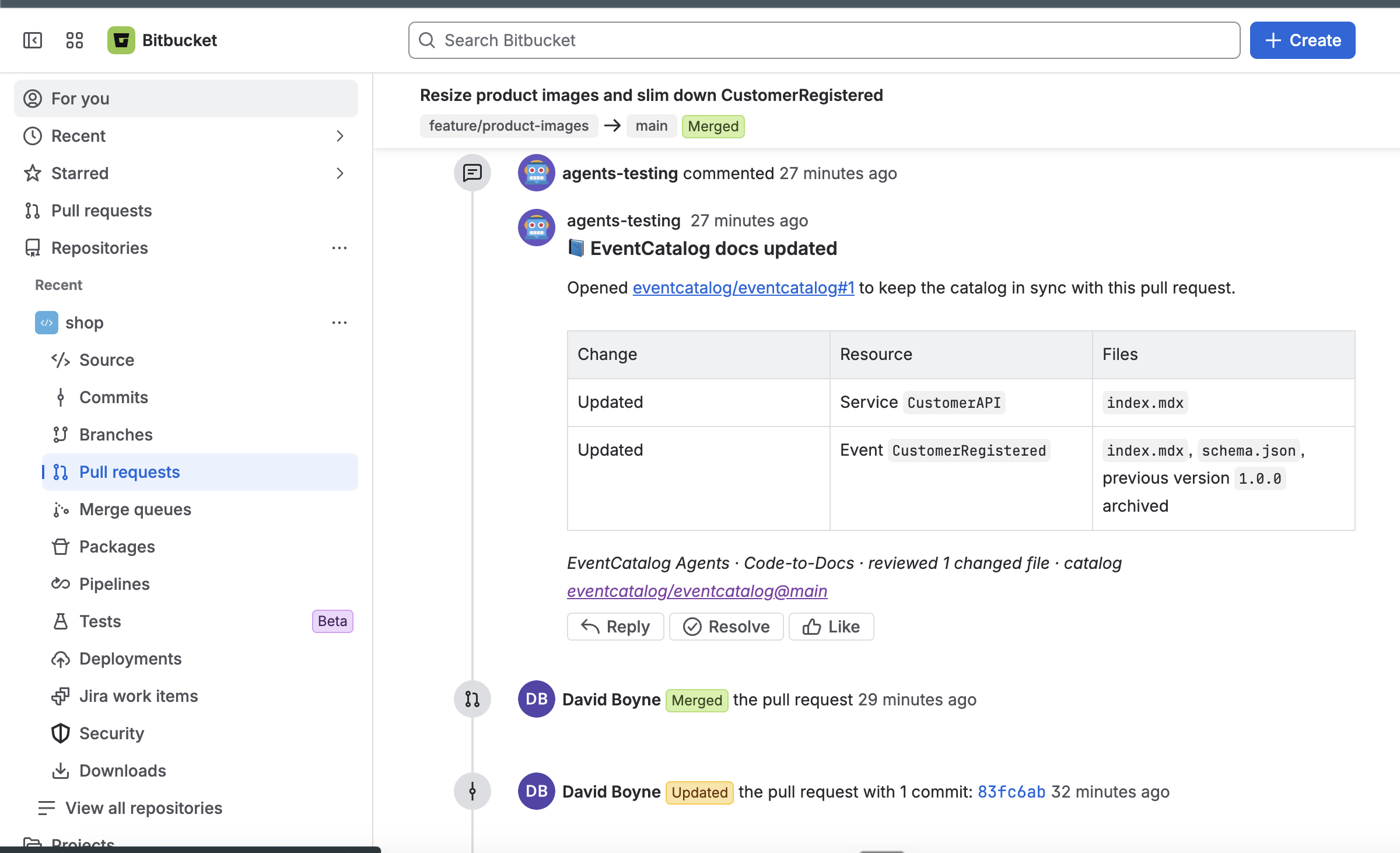
Once a pull request merges, a branch pipeline runs the agent on your main branch. It finds the pull request that merged, opens a pull request in your catalog repository, and comments on the merged pull request with a link to it:
Before you start
You need:
- A Bitbucket Cloud repository with your source code (the source repository), with Pipelines turned on (Repository settings → Pipelines → Settings). Bitbucket only lets you turn on Pipelines once you've set up Bitbucket two-step verification, which is separate from your Atlassian account's and needs an SSH key on your account first.
- An EventCatalog in a Bitbucket repository (the catalog repository), with the catalog at the root of the repository. Or keep it on GitHub.
- An API key for an AI model provider.
Setup
1. Create the access tokens
Bitbucket Pipelines has no built-in token for the REST API, so the agent uses repository access tokens. In each repository, open Repository settings → Security → Access tokens, and create a token with these permissions:
| Repository | Permissions |
|---|---|
| Source repository | Repositories: Read and Pull requests: Write, to find the pull request that merged and comment on it. Pipelines: Read too, so scheduled pipelines are skipped. |
| Catalog repository | Repositories: Write and Pull requests: Write, to push a branch and open the catalog pull request |
The comment and the catalog pull request appear under each token's name, so name them something like EventCatalog Agents. If your plan has project or workspace access tokens, one token with all these permissions on both repositories works too.
2. Add the repository variables
In the source repository, open Repository settings → Pipelines → Repository variables, and add these as secured variables:
| Variable | Value |
|---|---|
EVENTCATALOG_BITBUCKET_TOKEN | The source repository's access token. |
EVENTCATALOG_CATALOG_TOKEN | The catalog repository's access token. Leave it out if the source token has access to the catalog. |
ANTHROPIC_API_KEY | Your model provider key (see models). |
Secured variables are hidden in the logs. To share them across repositories, add them as workspace variables instead.
3. Add the pipeline
Add a branch pipeline for your main branch to bitbucket-pipelines.yml in your source repository. If you already have the file, add the step under your own pipelines section.
pipelines:
  branches:
    main: # runs once a pull request merges into main
      - step:
          name: EventCatalog Code-to-Docs
          image: node:24
          clone:
            depth: full
          script:
            - git clone --quiet --depth 1 --branch v2 https://github.com/event-catalog/agents.git /tmp/eventcatalog-agents
            - /tmp/eventcatalog-agents/bitbucket-pipelines/run.sh code-to-docs --catalog-repo acme/eventcatalog
Replace acme/eventcatalog with your catalog repository, as workspace/repo.
- Keep
clone: depth: full. The agent needs the history to find the commits the pull request added, and Bitbucket clones only the last 50 commits by default. - Keep
image: node:24, or use another image with Node.js 22.19 or later and git.
4. Check it works
Merge a pull request that changes your architecture, such as a new event or a changed schema. The pipeline runs on your main branch, the agent opens a pull request in your catalog repository, and comments on the pull request you merged with a link to it.
Choose when it runs
The pipeline above runs Code-to-Docs when a pull request merges, which we recommend. Merge commits, squash merges, fast-forward merges and rebase merges all work. Runs you start by hand document the pull request that merged. A commit pushed straight to main has no pull request, and scheduled pipelines aren't about a pull request, so both are skipped.
To run it while the pull request is open instead, so reviewers see the catalog update next to the code, run the step from a pull request pipeline:
pipelines:
  pull-requests:
    '**': # every pull request
      - step:
          name: EventCatalog Code-to-Docs
          image: node:24
          clone:
            depth: full
          script:
            - git clone --quiet --depth 1 --branch v2 https://github.com/event-catalog/agents.git /tmp/eventcatalog-agents
            - /tmp/eventcatalog-agents/bitbucket-pipelines/run.sh code-to-docs --catalog-repo acme/eventcatalog
See the introduction for how the two compare.
Options
The first argument is the workflow. The options follow it:
| Option | Required | Default | Description |
|---|---|---|---|
code-to-docs | Yes | The workflow to run. | |
--catalog-repo | Yes | Your catalog repository: workspace/repo (or repo in the same workspace), or its URL. owner/repo for GitHub. | |
--catalog-ref | No | main | The catalog branch to read, and to open pull requests against. |
--catalog-provider | No | bitbucket | Where your catalog is hosted: bitbucket or github. |
--model | No | anthropic/claude-sonnet-4-6 | The model the agent uses. See models. |
--ignore-paths | No | Build and dependency folders | Comma-separated paths or glob patterns to leave out of the review. Your list replaces the defaults. |
--source-dir | No | $BITBUCKET_CLONE_DIR | The source checkout to compare. |
To pin an exact release, change --branch v2 in the git clone line to a release such as --branch v2.4.0.
Use a catalog on GitHub
To keep your catalog on GitHub with your code in Bitbucket, add --catalog-provider github, set --catalog-repo to owner/repo, and set EVENTCATALOG_CATALOG_TOKEN to a GitHub token. A fine-grained token scoped to the catalog repository needs Contents and Pull requests set to Read and write.
Differences from GitHub
- Bitbucket has no built-in token, so you create access tokens for the agent and add them as secured variables.
- A rebased pull request is recognised by its commit messages, because Bitbucket doesn't record which merge strategy was used. If the pull request's branch merged in another feature branch before a fast-forward merge, only its last commit is documented.
Troubleshooting
| Message | What to do |
|---|---|
Cannot find the commits to compare | Set clone: depth: full on the step. |
Bitbucket needs an access token to comment on pull requests | Add the EVENTCATALOG_BITBUCKET_TOKEN secured variable. |
Catalog token cannot access … or Could not fetch branch … | Give the catalog token the permissions above, and check --catalog-repo and --catalog-ref. |
failed (401): Unauthorized: the token was not accepted | The access token has expired or was revoked. Create a new one. |
No pull request merged as commit … | The pipeline ran for a commit pushed straight to main. There is nothing to document. |
| No comment on the merged pull request | Give the source token Pull requests: Write on the source repository. |
Bitbucket Data Center
The agent supports Bitbucket Cloud. Bitbucket Data Center has a different API and isn't supported.