Set up ADR Compliance with Azure DevOps
Run ADR Compliance in Azure Pipelines on your Azure Repos pull requests, from the EventCatalog Agents pipeline template. New to ADR Compliance? Read the introduction first.
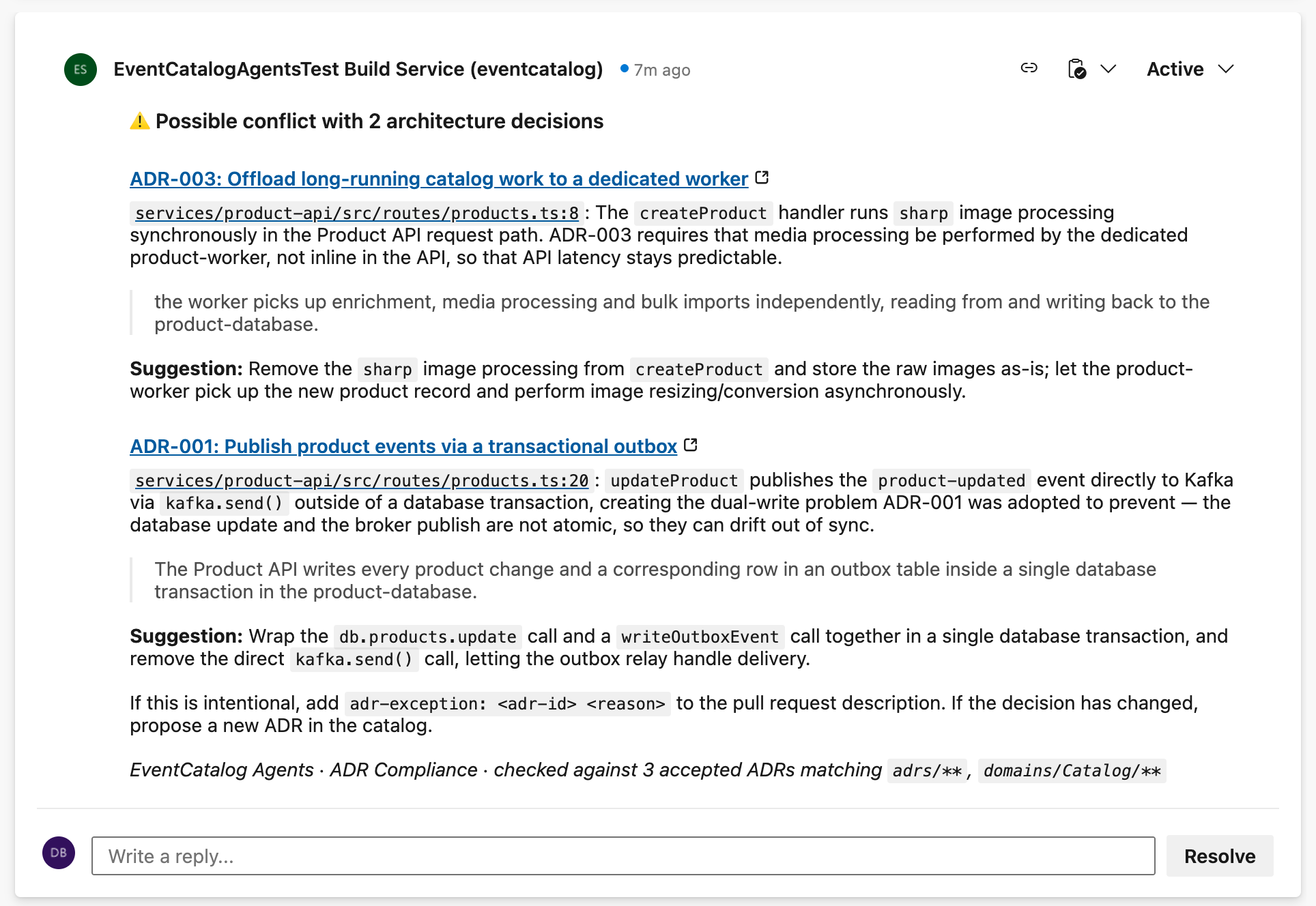
The agent runs from a build validation branch policy while the pull request is open. A conflict opens an active thread, so reviewers see it. Once the conflicts are fixed, the thread is marked resolved:
Before you start
You need:
- An Azure DevOps organization with your source code in an Azure Repos Git repository (the source repository).
- An EventCatalog in an Azure Repos repository (the catalog repository), with the catalog at the root of the repository, and your decisions documented as ADRs. It can be in another project of the same organization. Or keep it on GitHub.
- An API key for an AI model provider.
- Microsoft-hosted agents, or a self-hosted Linux agent with internet access. New Azure DevOps organizations have no free Microsoft-hosted agents until you request them, which usually takes a few days.
Setup
1. Add your model provider key
In Pipelines → Library, create a variable group named eventcatalog, and add your model provider key as a secret variable, such as ANTHROPIC_API_KEY (see models). Azure Pipelines passes secret variables to the agent only when you map them in the template's env parameter, as the pipeline below does.
2. Give the build service access
The agent uses the pipeline's own token (System.AccessToken), so you don't need a personal access token. The token belongs to your project's build service, <Project> Build Service (<Organization>). If your pipelines aren't limited to the current project, it's Project Collection Build Service (<Organization>) instead.
In Project settings → Repositories, select each repository, open Security, find the build service, and allow:
| Repository | Permissions |
|---|---|
| Source repository | Contribute to pull requests, to comment and to read the description for exceptions |
| Catalog repository | Read. The workflow never writes to it. |
The build service only appears in the list after the pipeline has run once. If your catalog is in a different project, also give the build service access to that project.
3. Add the pipeline
The template lives in the EventCatalog Agents repository. To use it, reference that repository as a resource. Azure Pipelines needs a GitHub service connection to read templates from GitHub. The repository is public, so any connection works. If you can't add one, copy the template instead.
Add this file to your source repository, and create a pipeline from it (Pipelines → New pipeline → Azure Repos Git → Existing Azure Pipelines YAML file):
trigger: none # runs from the build validation policy

resources:
  repositories:
    - repository: eventcatalog-agents
      type: github
      endpoint: github # the name of your GitHub service connection
      name: event-catalog/agents
      ref: refs/tags/v2
    - repository: catalog
      type: git
      name: Architecture/eventcatalog # your catalog repository: Project/Repo

pool:
  vmImage: ubuntu-latest

variables:
  - group: eventcatalog # holds ANTHROPIC_API_KEY

jobs:
  - job: adr_compliance
    uses:
      repositories: [catalog]
    steps:
      - checkout: self
        fetchDepth: 0
      - template: azure-pipelines/eventcatalog-agents.yml@eventcatalog-agents
        parameters:
          agent: adr-compliance
          # The ADRs to check against, as globs from your catalog's root.
          adrs: adrs/**, domains/Orders/**
          catalogRepo: Architecture/eventcatalog
          catalogUrl: https://catalog.example.com # optional: links ADRs to your hosted catalog
          env:
            ANTHROPIC_API_KEY: $(ANTHROPIC_API_KEY)
Replace Architecture/eventcatalog with your catalog repository, as Project/Repo, in both places, and set adrs to the ADRs that apply to this repository.
- Keep
fetchDepth: 0. The agent needs the history to compare the pull request with its target branch, and new pipelines fetch only the latest commit by default. - Keep the
catalogresource anduses. They give the job's token access to the catalog repository, which the Protect access to repositories in YAML pipelines setting requires. It's on by default. Approve the pipeline's access to the repository on its first run.
4. Add build validation
In Project settings → Repositories → your source repository → Policies, open your main branch, and add the pipeline under Build validation:
- Trigger: Automatic.
- Policy requirement: Optional. ADR Compliance is advisory, and a failure such as a model provider outage shouldn't block a merge.
5. Check it works
Open a pull request that does something one of your accepted ADRs rules out. The agent comments in an active thread. Each push updates the same thread.
Exceptions in Azure DevOps
The agent reads exceptions from the pull request description when it runs. Azure Pipelines doesn't run when a description changes, so after adding an adr-exception: line, push a commit or re-queue the pull request's build validation.
Parameters
| Parameter | Required | Default | Description |
|---|---|---|---|
agent | Yes | Set to adr-compliance to run this workflow. | |
adrs | Yes | Comma-separated globs, relative to the catalog root, selecting the ADRs to check against. | |
catalogRepo | Yes | Your catalog repository: Project/Repo (or Repo in the same project), or its URL. owner/repo for GitHub. | |
catalogRef | No | main | The catalog branch to read. |
catalogProvider | No | azure-devops | Where your catalog is hosted: azure-devops or github. |
catalogToken | No | $(System.AccessToken) | A token that can read the catalog repository. |
catalogUrl | No | The URL of your hosted catalog. The comment links ADRs to it. Without it, they link to your catalog repository. | |
model | No | anthropic/claude-sonnet-4-6 | The model the agent uses. See models. |
ignorePaths | No | Build and dependency folders | Comma-separated paths or glob patterns to leave out of the review. |
workspace | No | $(Build.SourcesDirectory) | The source checkout to compare. If a job checks out more than one repository, self moves to $(Build.SourcesDirectory)/<repo>: set this to match. |
agentsVersion | No | v2 | The EventCatalog Agents release to run. Keep it the same as the ref of the eventcatalog-agents resource. |
env | No | {} | Environment variables for the agent, such as your model provider key: { ANTHROPIC_API_KEY: $(ANTHROPIC_API_KEY) }. |
To pin an exact release, set both the resource's ref (for example refs/tags/v2.3.0) and agentsVersion: v2.3.0.
Use a catalog on GitHub
To keep your catalog on GitHub with your code in Azure Repos, set catalogProvider: github, set catalogRepo to owner/repo, and pass a GitHub token that can read the catalog repository from a secret variable, such as catalogToken: $(GITHUB_CATALOG_TOKEN). A fine-grained token needs only Contents: Read. You don't need the catalog repository resource or uses.
Use the template without a GitHub connection
Copy azure-pipelines/eventcatalog-agents.yml into your repository, or into a shared templates repository in Azure Repos, and reference it by path, such as template: templates/eventcatalog-agents.yml. Set agentsVersion to the release you copied it from. The template still downloads the agent from GitHub when it runs, so the build agent needs internet access, as it does for your model provider and npm.
Differences from GitHub
- The comment is a thread with a status. A conflict opens an active thread, which counts towards the Check for comment resolution policy if you use one. Once the conflicts are gone, the thread is marked resolved. Reruns update the same thread.
- Exceptions need a new run, as above.
Troubleshooting
| Message | What to do |
|---|---|
Cannot find the commits to compare | Set fetchDepth: 0 on the checkout: self step. |
Could not fetch branch … | Give the build service Read on the catalog repository, and keep the catalog resource and uses in the job. |
failed (401): the token was not accepted | Your personal access token has expired, or lacks the Code scope. |
| No comment on the pull request | The pull request may follow your ADRs. If it doesn't, give the build service Contribute to pull requests on the source repository. |
Azure DevOps Server
The agent uses Azure DevOps REST API version 6.0, which Azure DevOps Server 2020 and later support, so it should work on Azure DevOps Server too. We test with Azure DevOps Services. A full catalogRepo URL on Server must include the project: https://server/tfs/Collection/Project/_git/Repo.