Customize visualizer nodes
Added in
eventcatalog@2.33.8Every node in the visualizer has a color, label and icon.
The example below shows the default node for a Service resource.
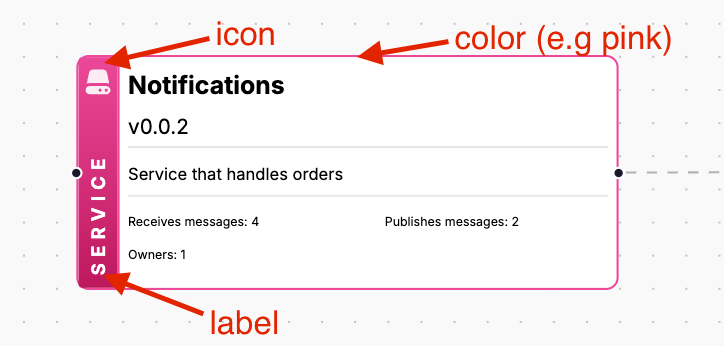
By default the icon, color and label in the node is generated by EventCatalog. Helping you maintain consistency across your catalog.
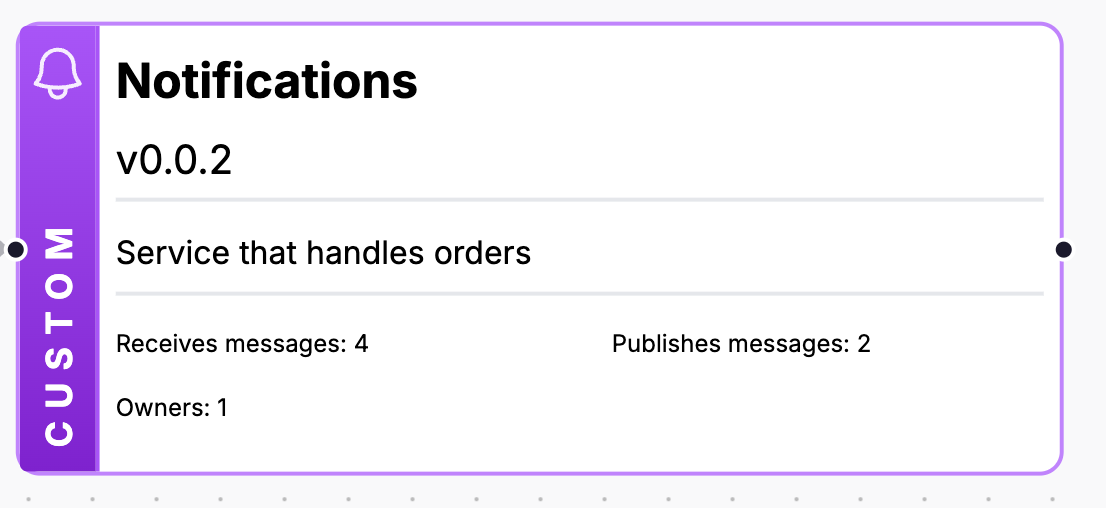
You can use the styles property to customize the icon, color and label of the node, if you want to customize the node to be more specific to your use case.
/domains/MyDomain/services/MyService.md
---
id: NotificationService
version: 0.0.2
name: Notification Service
summary: |
  Service that handles orders
styles:
  icon: /icons/bell.svg
  node:
    color: purple
    label: "Custom"
---
Rendered output
Configuration
| ID | Required | Default | Description |
|---|---|---|---|
styles.icon | No | Depends on resource type | An icon shown next to the resource's name: a path to an image in your catalog's public folder (e.g. /icons/bell.svg) or an image URL. Domain, flow and entity nodes also take a Heroicons name (e.g. BellIcon). |
styles.node.color | No | Depends on resource type | The color to use for the node: a Tailwind color name (e.g. blue, emerald) or a hex color (e.g. #0ea5e9). It colors the node's border, badge and handles. |
styles.node.label | No | Depends on resource type | The label shown in the node's type badge, in place of its type (e.g. Service). |
Colors and labels apply to services, events, commands, queries, channels, data stores, data products, agents and flows.