NodeGraph
A component to visually render your information.
The <NodeGraph/> component is supported in domains, services, and all messages, changelogs, and custom documentation pages.
Single NodeGraph
Example
<NodeGraph/>
Output
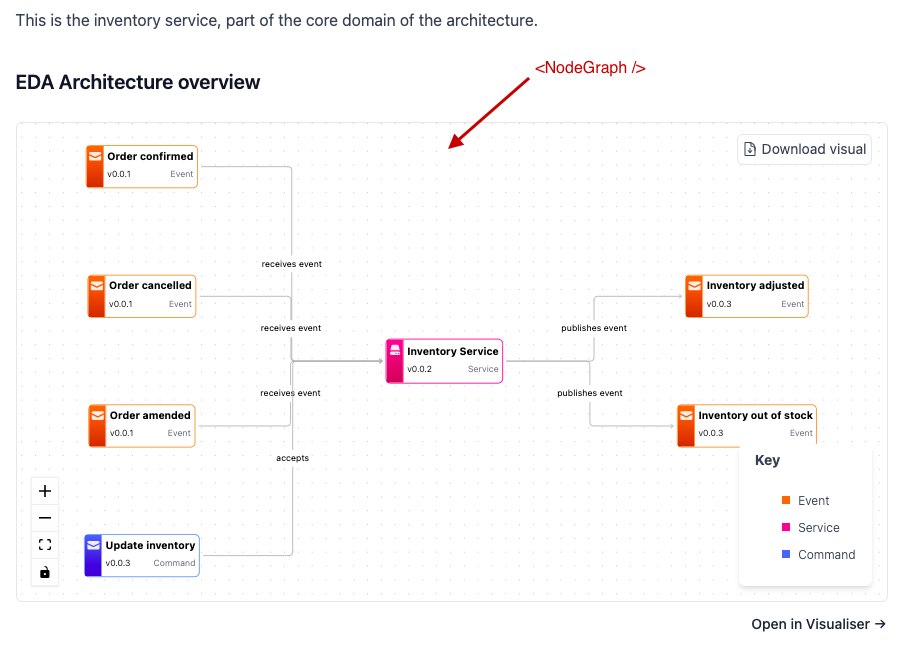
Props
eventcatalog@3.36.3| Name | Type | Default | Description |
|---|---|---|---|
maxHeight (optional) | string | 30 | Max height to set the nodegraph in your document |
search (optional) | boolean | true | Show or hide the search bar. Accepts true/false or "true"/"false". |
legend (optional) | boolean | true | Show or hide the legend. Accepts true/false or "true"/"false". |
mode (optional) | string ("simple" or "full") | "simple" | simple renders a simplified view without descriptions. full renders descriptions and other information. |
Interactive controls
eventcatalog@3.9.0All NodeGraph visualizations include interactive controls for better viewing, exploration, and sharing.
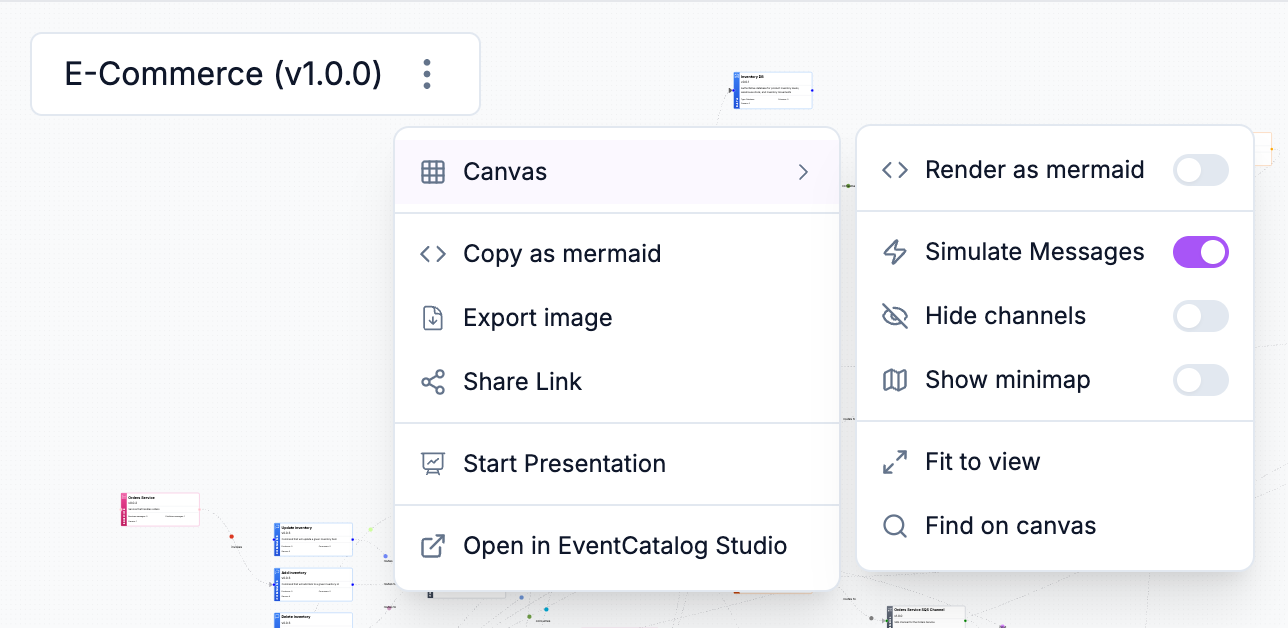
View modes
Switch between two visualization modes using the view switcher dropdown.
React Flow - Interactive node-based visualization with drag and pan controls.
Mermaid - Standard Mermaid diagram view with automatic layout and pan/zoom controls.
Export as Mermaid
Copy the NodeGraph as Mermaid diagram code to your clipboard. The diagram preserves all nodes, edges, and styling information.
Useful for sharing architectures with LLMs, documentation tools, or pasting into Mermaid-compatible renderers like mermaid.live.
If you export large NodeGraphs and they fail to render as Mermaid diagrams, increase the maxTextSize configuration. Learn more about maxTextSize.
Share URL
Copy the current page URL to share the visualization with your team.
Layout persistence
eventcatalog@3.11.0Save and restore custom node positions in the visualizer during development.
When you drag nodes to arrange your visualization, a "Layout changed" indicator appears with a quick save button. Layouts are saved to _data/visualizer-layouts/ as JSON files and can be committed to git to share with your team.
Layout persistence is only available when running EventCatalog in development mode (npm run start). This ensures saved layouts don't affect production builds.
Saving layouts
Drag any node to reposition it. When changes are detected, the "Layout changed" indicator appears in the bottom-left corner with a quick save button.
You can also save layouts from the dropdown menu:
- Click the menu icon (three dots) in the top-right corner
- Select Layout > Save Layout
Layouts are saved to _data/visualizer-layouts/{collection}/{id}/{version}.json in your catalog directory.
Resetting layouts
Reset a saved layout to return to auto-positioning:
- Click the menu icon (three dots) in the top-right corner
- Select Layout > Reset Layout
- Confirm the reset
This deletes the saved layout file and reloads the page with auto-calculated positions.
Layout files
Layout files are keyed by resource (collection/id/version), so the same layout is used whether viewing in the visualizer or embedded in documentation.
Works across all visualizers including services, events, flows, domains, entity maps, and designs.
Example layout file structure:
{
  "version": 1,
  "savedAt": "2026-01-29T12:00:00.000Z",
  "resourceKey": "services/OrderService/1.0.0",
  "positions": {
    "node-1": { "x": 100, "y": 200 },
    "node-2": { "x": 300, "y": 400 }
  }
}
Sharing layouts with your team
Saved layouts can be committed to git and shared with your team. When team members pull the changes, they'll see the same node positions in their local development environment.
Add the layout directory to your git repository:
git add _data/visualizer-layouts
git commit -m "Add custom visualizer layouts"
Multiple NodeGraphs
eventcatalog@2.37.3You can add multiple NodeGraphs to your document by using the NodeGraph component multiple times.
Here is an example of how to add multiple NodeGraphs to your document:
<!-- Without any properties, this will render the current pages NodeGraph like you see in the above example -->
<NodeGraph/>

<!--  -->
<div class="grid grid-cols-2 gap-4 not-prose">
  <!-- We tell EventCatalog to render the Orders Domain version 0.0.3 NodeGraph -->
  <NodeGraph id="Orders" version="0.0.3" type="domain" />
  <!-- We tell EventCatalog to render the Subscription Domain version 0.0.1 NodeGraph -->
  <NodeGraph id="Subscription" version="0.0.1" type="domain" />
</div>
Output
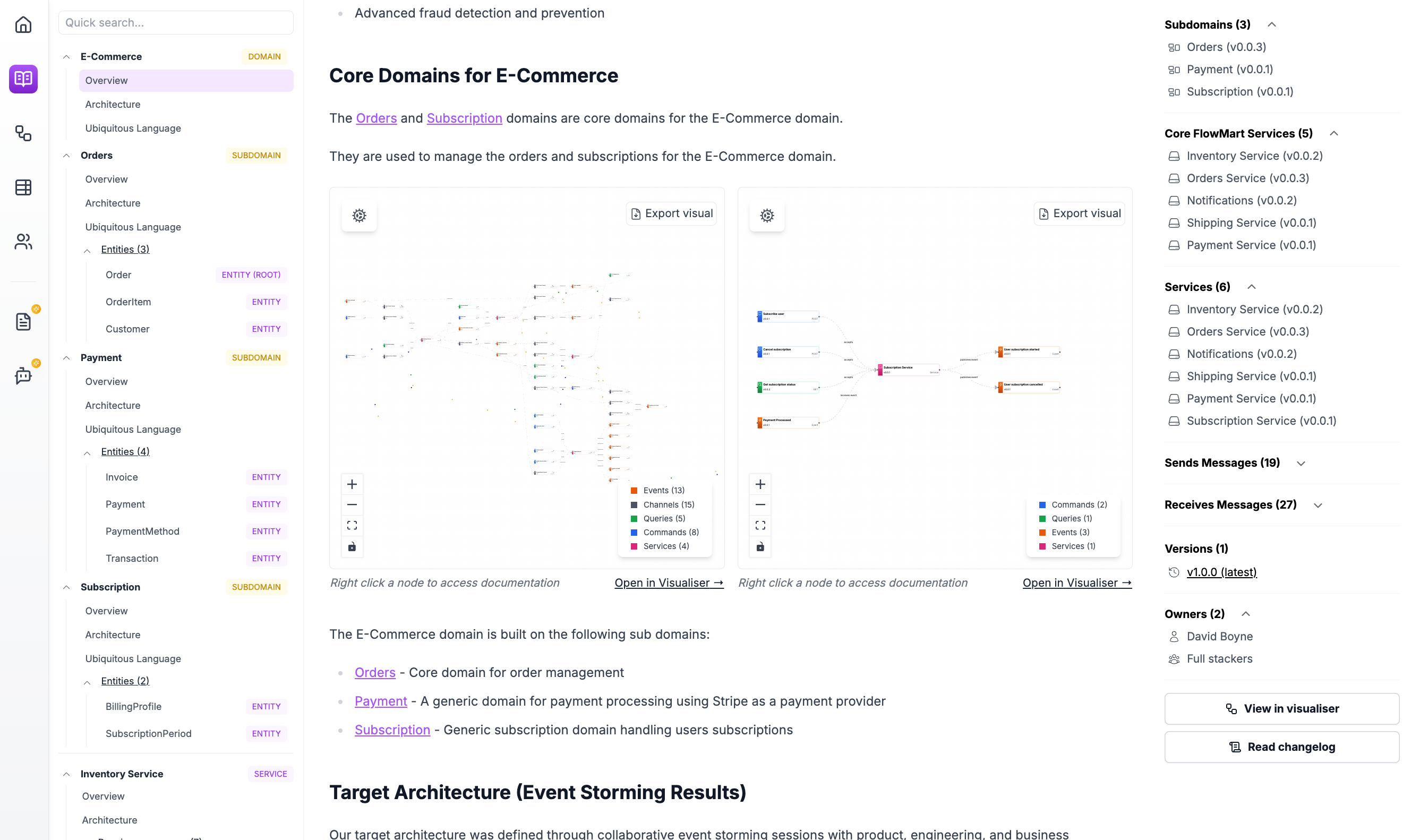
You can see a demo of this here
Props
| Name | Type | Default | Description |
|---|---|---|---|
id | string | undefined | The id of the NodeGraph to render. If not provided, the current page's NodeGraph will be rendered. |
version | string | undefined | The version of the NodeGraph to render. If not provided, the current page's NodeGraph will be rendered. |
type | string | undefined | The type of the NodeGraph to render. If not provided, the current page's NodeGraph will be rendered. |