Modelling more message patterns in EventCatalog

I'm happy to share that EventCatalog 2.65.0 is now out.
This release includes the following highlights:
- New: Channel updates in EventCatalog
- A new way to model more message patterns in EventCatalog, chain channels together and much more...
- New: Producers and consumers are now visualized
- The visualizer now shows Producers and Consumers for your messages. Not just the service, to help you understand the bigger picture.
- New: Message colors added to the visualizer
- The visualizer now shows colored messages (nodes). This allows you to keep track of how messages flow in your architecture.
When you upgrade EventCatalog to 2.65.0 our migration script will migrate your channels for you ❤️.
This will change files in your EventCatalog that will be need to be reviewed and updated.
Channel updates in EventCatalog
Channels in EventCatalog have been updated to support more complex messaging patterns and flows.
Channels represent the transportation method of messages between producers and consumers.
Examples of channels could be:
- Kafka
- RabbitMQ
- AWS SQS
- AWS SNS
- AWS SNS
What has changed with Channels?
Previously in EventCatalog you would define and assign your channel to your messages.
This would tell EventCatalog that the OrderPlaced message is published to the orders.events channel.
---
id: OrderPlaced
... # other event frontmatter
channels:
  - id: orders.events
---
Although this worked, it limited the ability to model more complex messaging patterns and flows.
Moving forward you will now define how your messages are transported when documenting who is publishing and consuming these messages.
Define how your producers and consumers transport messages
When you define produces and consumers in EventCatalog, you use the sends and receives fields in your service frontmatter.
This example shows:
- The
OrderServicesending anOrderPlacedmessage - The
OrderServicereceiving aPaymentProcessed
---
id: OrderService
... # other service frontmatter
sends:
  - id: OrderPlaced
receives:
  - id: PaymentProcessed
---
In EventCatalog 2.65.0 you can now define how your messages are transported using the new to and from fields.
Example of assigning channels to producers and consumers
Here is an example of an OrderService that sends an OrderPlaced message and receives a PaymentProcessed message.
But now, we define the transport method for the message (e.g broker, queue, topic, etc.)
---
id: OrderService
... # other service frontmatter
sends:
  - id: OrderPlaced
    # OrderPlaced is published to the orders.events channel (e.g broker)
    to:
      - id: orders.events
receives:
  - id: PaymentProcessed
    # PaymentProcessed is consumed from the payments.events channel (e.g queue)
    from:
      - id: payments.events
---
This way allows you to model and visualize many more complex messaging patterns and flows.
In the example below, we implemented a simple publish/subscribe pattern with channels and routing.
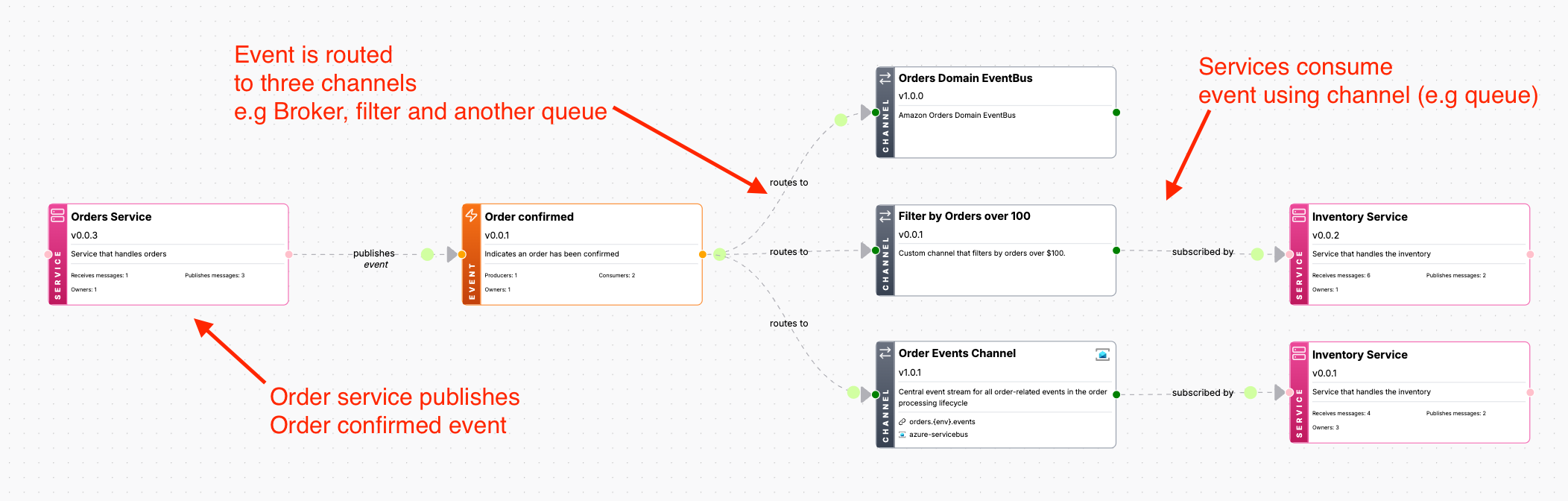
But we can also model more complex messaging patterns and flows.
Chain channels together to model more complex messaging patterns and flows
In some cases you may want to chain channels together, to document how messages are transported, filtered, changed and consumed.
Using channel to channel routing you can model more complex messaging patterns and flows.
Other examples of this could be:
- Broker -> Queue -> Processor -> Topic
- Queue -> Processor -> Topic
- Processor -> Topic
- Topic -> Queue
- Queue -> Broker
- Broker -> Queue -> Processor -> Topic -> Queue
- Broker -> Queue -> Processor -> Topic -> Queue -> Broker
To do this we have now added the new routes field in your channels.
The routes field tells EventCatalog the possible routes/destinations for the messages going through the channel.
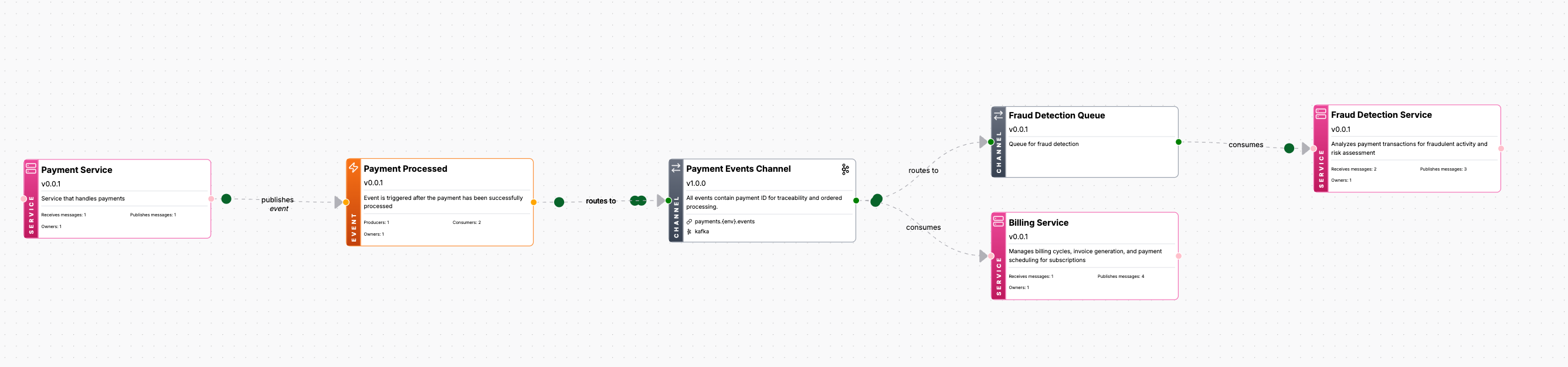
If you want to learn more about chaining channels together, you can read our chaining channels together guide.
Channels documentation can belong anywhere
Previously in EventCatalog, channels were only defined in the root /channels directory.
We have now changed this, and you can now defined channels in any directory you like.
This can be useful if you want to group channels by domain, service, team, etc.
/domains/
  /MyDomain/
    <!-- Channels at the domain level -->
    /channels/
    /services/
      /MyService/
        <!-- Channels at the service level -->
        /channels/
To get started you can create your channels folder in any directory you like (**/channels)
You can learn more reading our channels guide.
Producers and consumers are now visualized
Previously in EventCatalog, the visualizer would show you messages your services are consuming and producing (seen below)
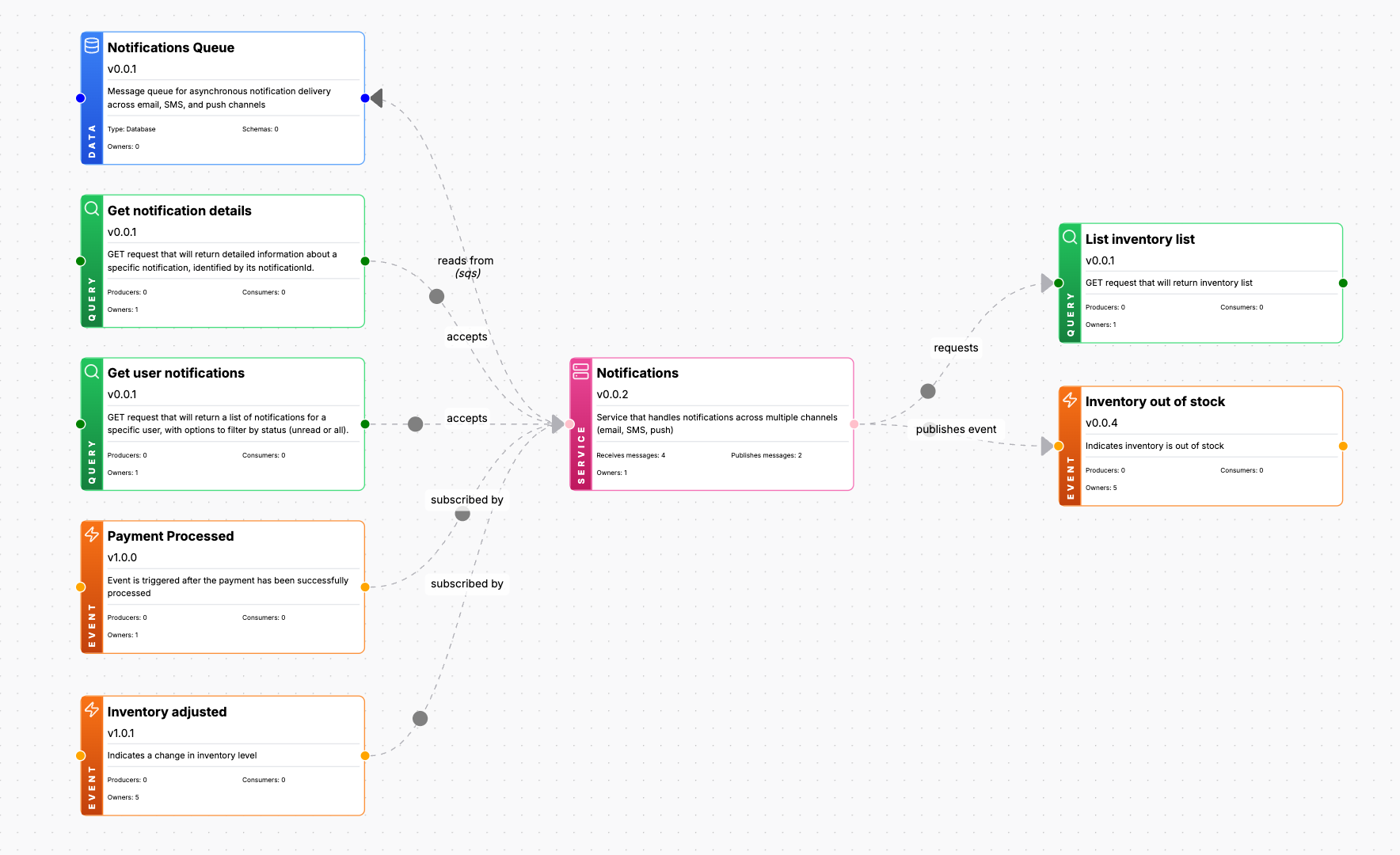
The problem is, that it does not show you the bigger picture. Who is producing the messages you are consuming or who is consuming the messages you are producing.
So In EventCatalog 2.65.0 we made a few changes to help visualize the bigger picture better.
See who is producing and consuming messages
The new visualizer will now show you exactly who is producing and consuming the messages you are sending and receiving.
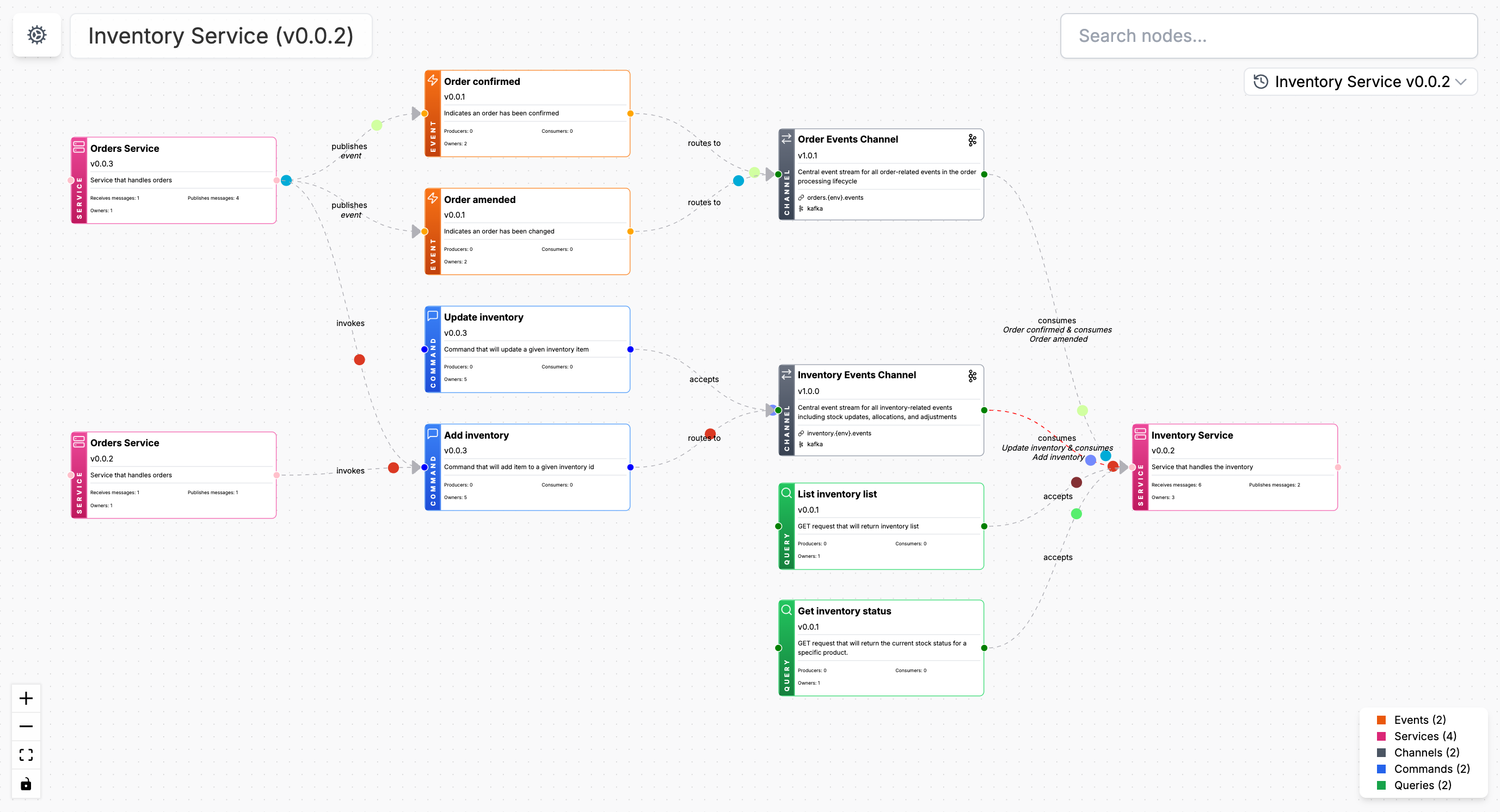
This can help your teams understand the bigger picture of your architecture and how messages are flowing.
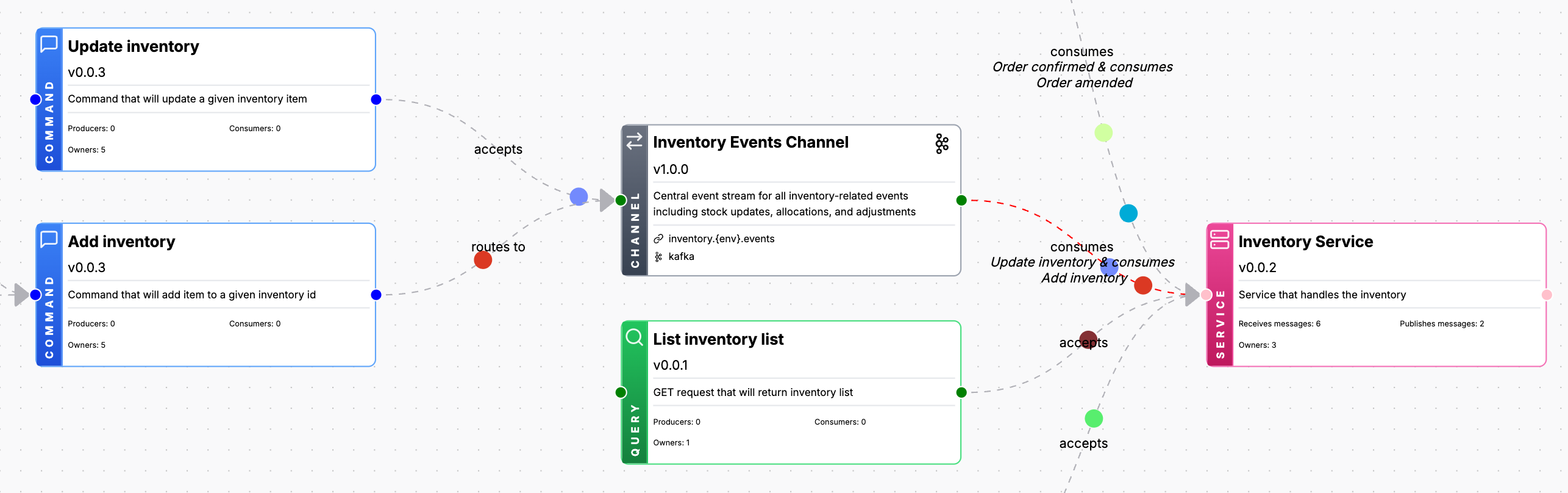
Message colors added to the visualizer
We have also added colors to add animated messages to the visualizer, and added support for multi animated messages between producers and consumers.
This visual guide can help you see how your messages are flowing through your architecture, without them all being the same color.
What's next?
More and more users are coming to EventCatalog to help them bring discoverability to their event-driven architecture and save teams time.
Our next goal is focus more on stability and focus on bug fixing and patching. So if you have any issues or feedback, please let us know.
Our next major features include:
- Adding domain level events (RFC)
- Added support for Containers In EventCatalog (RFC)
- Adding Data Products In EventCatalog (RFC)
- Adding Webhooks In EventCatalog (RFC)
Many people have given us awesome feedback over the past year, and we have made the new RFCs to help you model the architectures you want to document. And we are excited to see the new features and improvements coming to EventCatalog.
If you like EventCatalog, I would love a ⭐️ on GitHub, and feel free to join our Discord Channel, which now has over 1,200 members!