Comparing diagram versions (Scale)
eventcatalog@3.3.0Diagram comparison is available exclusively with the EventCatalog Scale license. This feature enables side-by-side visualization of different diagram versions.
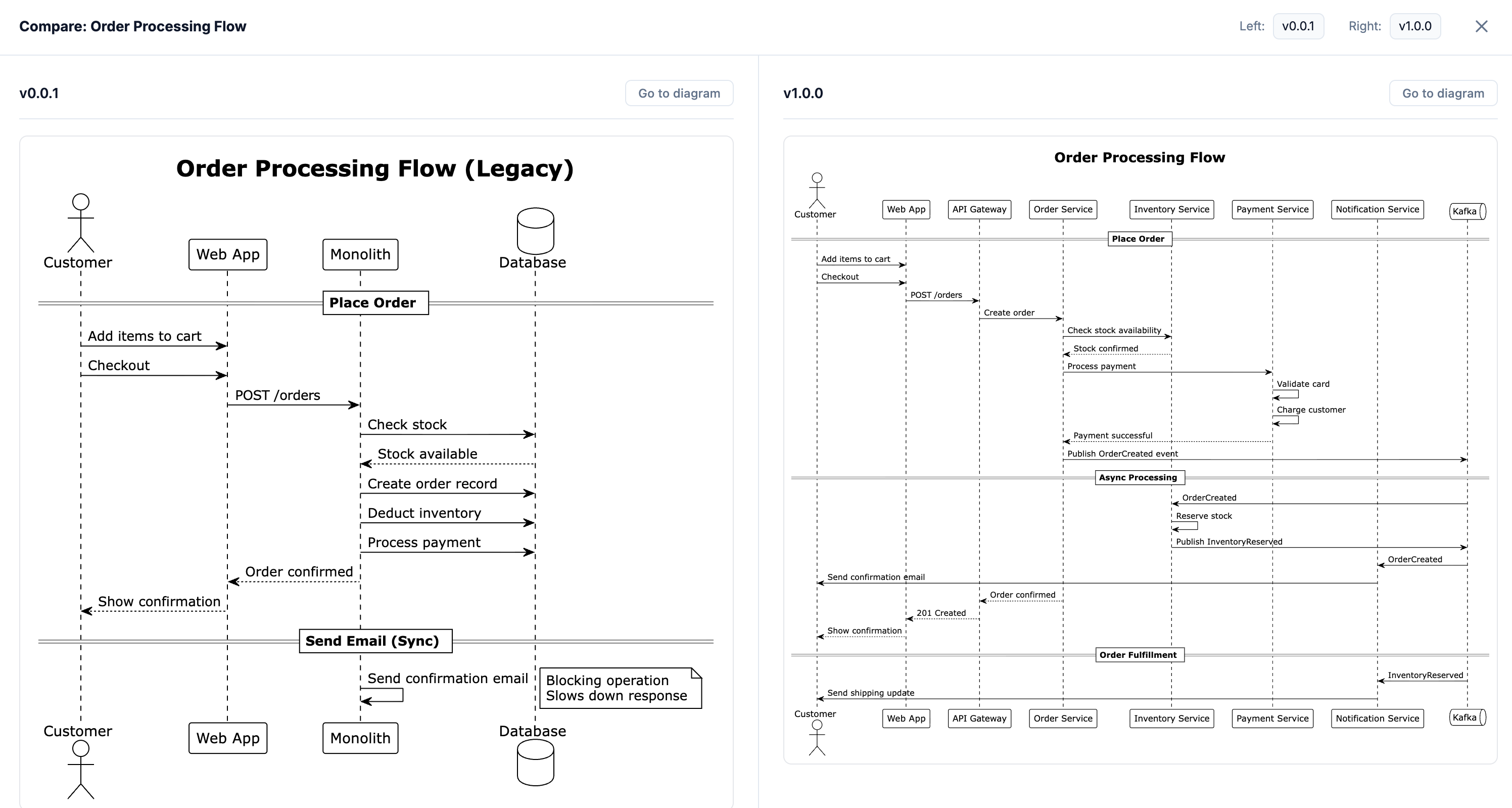
The diagram comparison feature allows you to view two versions of a diagram side-by-side, making it easy to understand architectural changes and evolution over time.
When to use diagram comparison
Diagram comparison is valuable for:
- Migration planning - Compare current state vs. target state architectures
- Change reviews - Visualize what changed between architectural iterations
- Documentation reviews - Ensure diagrams accurately reflect system changes
- Team communication - Show stakeholders the architectural progression
- Historical analysis - Understand why architectural decisions were made
Accessing diagram comparison
When viewing a diagram that has multiple versions, you'll see a "Compare diagram versions" button in the header (only available with Scale license).
Steps to compare
- Navigate to any diagram page that has multiple versions
- Click the "Compare diagram versions" button in the header
- Select which two versions you want to compare
- View both diagrams side-by-side with synchronized scrolling
Example use cases
Comparing migration states
Compare your current monolithic architecture with your target microservices architecture:
Version 1.0.0 (Current State):
- Monolithic application
- Single database
- Tightly coupled components
Version 2.0.0 (Target State):
- Event-driven microservices
- Database per service
- Kafka event backbone
Viewing these side-by-side helps teams understand the scope of the migration and communicate the changes to stakeholders.
Tracking architectural evolution
Compare different iterations of your architecture as it evolves:
Version 1.0.0:
- Initial MVP architecture
- 3 core services
Version 1.5.0:
- Added caching layer
- Introduced API gateway
- Split user service
Version 2.0.0:
- Full event-driven architecture
- 12 microservices
- Observability platform
Reviewing sequence flow changes
Compare how a business flow has changed between versions:
Version 1.0.0 - Synchronous Order Flow: Shows direct HTTP calls between services
Version 2.0.0 - Event-Driven Order Flow: Shows asynchronous event-based communication
This makes it clear how the system's behavior and coupling has evolved.
Comparison UI features
The comparison view provides:
- Side-by-side layout - Both diagrams displayed simultaneously
- Version labels - Clear indication of which version is shown on each side
- Synchronized scrolling - Scroll both diagrams together (optional)
- Full content - All markdown content and diagrams from both versions
- Independent navigation - Switch versions independently on each side
Best practices
Prepare diagrams for comparison
When creating diagrams you plan to compare:
- Use consistent formatting - Keep similar elements in the same positions when possible
- Highlight changes - Use annotations or callouts to draw attention to differences
- Add context - Include notes explaining what changed and why
- Match diagram types - Compare sequence diagrams with sequence diagrams, architecture diagrams with architecture diagrams
Document what changed
In your diagram content, call out the key differences:
---
id: order-flow
name: Order Processing Flow
version: 2.0.0
summary: Event-driven order processing (updated for async architecture)
---

## What Changed in v2.0.0

Compared to version 1.0.0, this flow now uses event-driven architecture:

- **Removed**: Synchronous HTTP calls between services
- **Added**: Kafka event stream for service communication
- **Changed**: Order Service now publishes OrderCreated event instead of calling downstream services directly
- **Benefit**: Improved resilience and scalability

_```mermaid
sequenceDiagram
    Customer->>OrderService: Place Order
    OrderService->>Kafka: Publish OrderCreated
    Kafka->>InventoryService: OrderCreated Event
    Kafka->>PaymentService: OrderCreated Event
```_