EventCatalog for Backstage
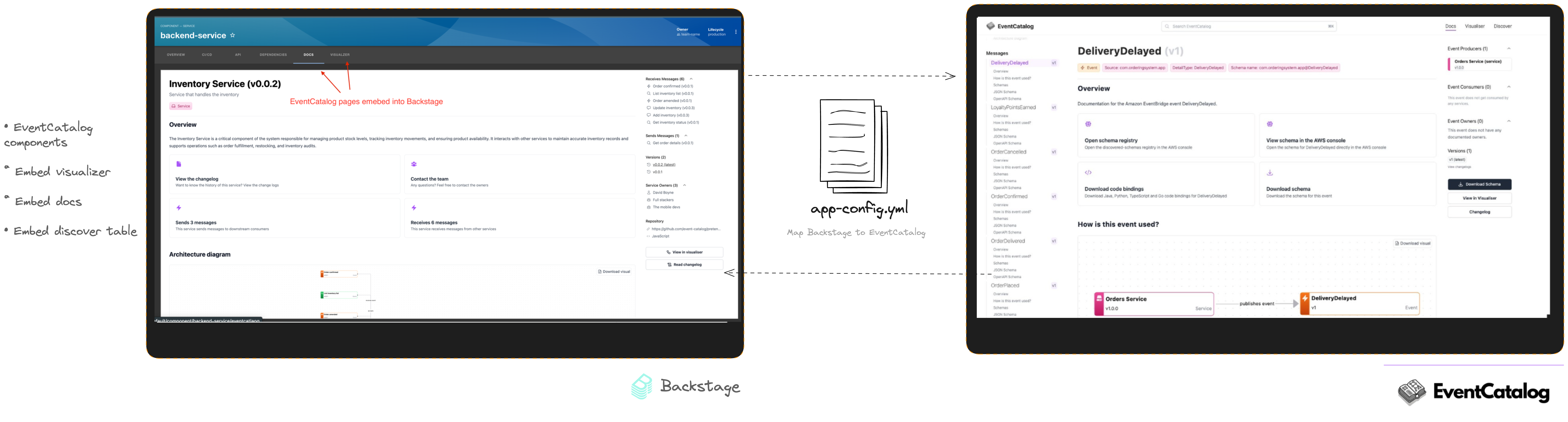
The EventCatalog Backstage plugin embeds EventCatalog views in Backstage entity pages. Developers can explore architecture documentation without leaving the software catalog they use for ownership, APIs, dependencies, and operations.
Choose where to start
- New to the plugin? Follow Embed EventCatalog in your first Backstage entity.
- Adding a dedicated entity tab? Use Embed EventCatalog as entity tabs.
- Adding content to an existing overview? Use Add EventCatalog cards to an overview page.
- Need exact props or supported components? See the component reference.
- Upgrading from the legacy resource mapping? Follow Migrate to entity annotations.
Supported views
You can embed:
- resource documentation
- resource visualizers
- message discovery tables
- entity maps
- the schema explorer
- the Architecture Graph, focused on a resource at depth 1, 2, or 3
- the System Context Map overview or a specific system and version
- a flow visualizer for a specific flow and version
Every page and card accepts theme="light" or theme="dark". If you omit theme, EventCatalog uses the visitor's saved EventCatalog theme.
How the integration fits together
The plugin reads the EventCatalog base URL from Backstage configuration and normally reads the EventCatalog resource identity from annotations on the current Backstage entity. It then renders the selected EventCatalog view in an iframe with embed mode enabled.
Read How EventCatalog embeds work for the mapping, rendering, and sizing model.
Licensing
The Backstage plugin is open source under the MIT License and doesn't need a license key. If you previously set a license key for the plugin, you can remove it because it's ignored.