Consumer Field Usage
eventcatalog@3.24.0Field Usage lets consumers declare which specific fields of a message they depend on. When fields are declared, EventCatalog generates a Field Usage page for that message showing a cross-service view of field dependencies.
This gives producers visibility into downstream impact before changing or removing a field.
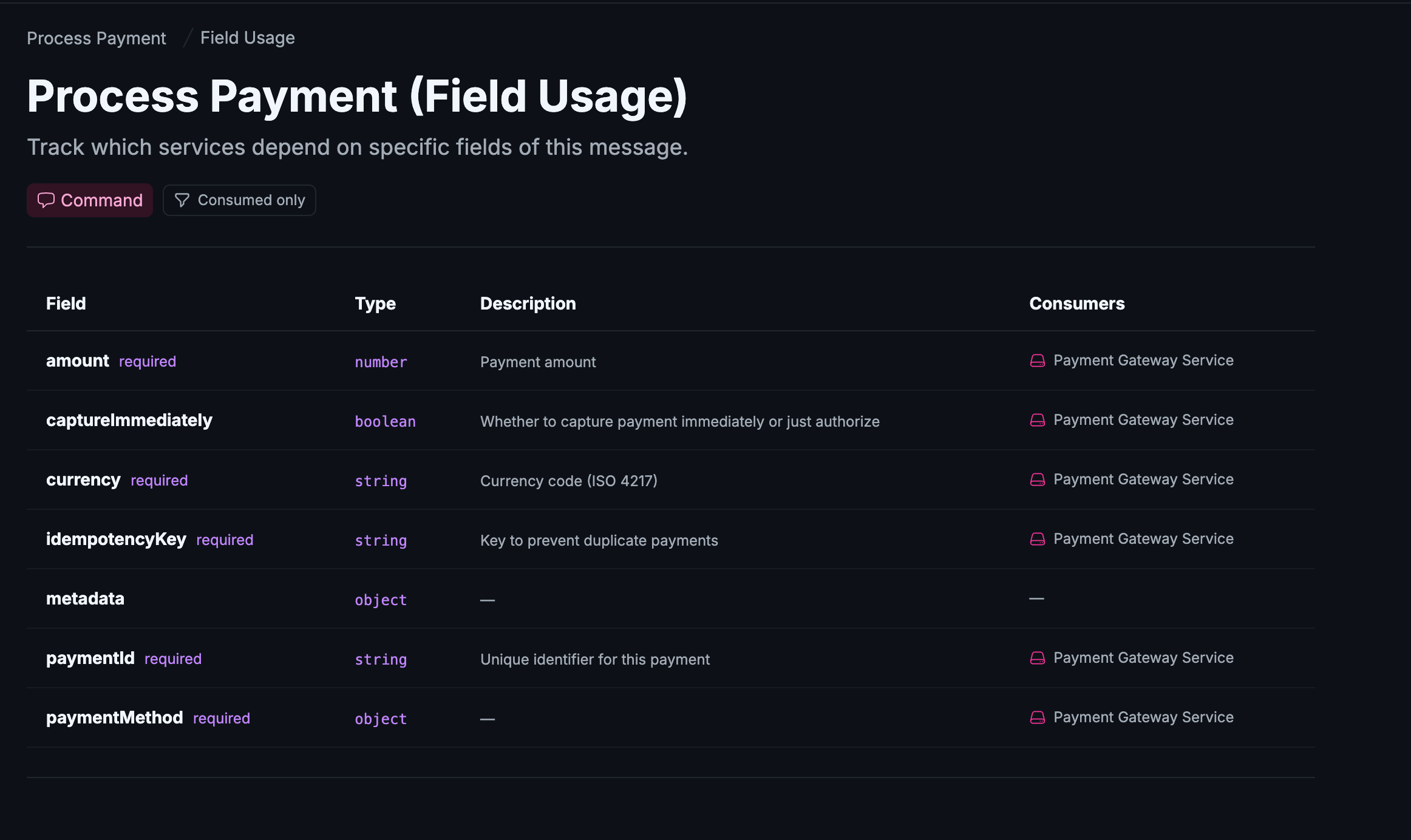
Declare fields in services
To declare field dependencies, add a fields array to any entry in your service's receives frontmatter.
---
id: ShippingService
version: 1.0.0
receives:
  - id: PaymentProcessed
    version: 1.0.0
    fields:
      - orderId
      - amount
      - currency
    from:
      - id: payments.events
---
The fields array is a list of field names as strings. Only include the fields your service actually reads -- you do not need to list every field in the message.
Declare fields in domains
Domains support the same fields property on their receives pointers.
---
id: Billing
version: 1.0.0
receives:
  - id: PaymentProcessed
    version: 1.0.0
    fields:
      - orderId
      - amount
---
View the Field Usage page
When a message has a schemaPath set and at least one service or domain declares fields for that message, a Field Usage link appears in the message sidebar under "API & Contracts".
Navigate to any message page and click Field Usage in the sidebar, or go directly to:
http://localhost:3000/docs/{type}/{id}/{version}/field-lineage
The page shows a table with the following columns:
| Column | Description |
|---|---|
| Field | The field name from the schema |
| Type | The data type (extracted from the schema) |
| Description | The field description (extracted from the schema) |
| Consumers | Services or domains that declared a dependency on this field |
All fields from the schema are listed -- not only the ones with declared consumers. This gives you a complete picture and makes it easy to spot unused fields.
Use the Consumed only filter button to narrow the list down to fields that have at least one consumer.
Understand the "Fields not found in schema" section
If a service declares a field that does not exist in the message schema, it appears in a separate Fields not found in schema warning section at the bottom of the page.
This section helps you catch:
- Typos in field names declared by consumers
- Fields that were removed from the schema but are still referenced by consumers
- Outdated documentation that has drifted from the actual schema
Resolving these mismatches keeps your documentation accurate and prevents consumers from unknowingly depending on fields that no longer exist.
Supported schema formats
Field metadata (type and description) is automatically extracted from the message schema. The following formats are supported:
- JSON Schema
- Avro
- Protobuf
If your schema is in a different format, the Field Usage page will still list declared consumers but will not show type or description information.
Use the SDK
The fields property is also available when using the EventCatalog SDK to programmatically add messages to services or domains.
import { addEventToService } from '@eventcatalog/sdk';

await addEventToService('ShippingService', 'receives', {
  id: 'PaymentProcessed',
  version: '1.0.0',
  fields: ['orderId', 'amount', 'currency'],
});
The same fields option is available on addCommandToService, addQueryToService, addEventToDomain, addCommandToDomain, and addQueryToDomain.