# Getting started
Copy as Markdown[View as Markdown](/docs/plugins/backstage/intro.md)
***
**License:** `Dual-license`
[YouTube video player](https://www.youtube.com/embed/mjf7qwoSAC4?si=eBZfgjMOQrD75teb)
***
Many folks are using [Backstage](https://backstage.spotify.com/) for their internal developer portals. Backstage is a highly configurable platform that allows you to document your architecture in components, apis, services, domains and much more.
Backstage supports plugins, that have a frontend and backend support.
Using the EventCatalog Backstage plugin you can embed your EventCatalog information into backstage.
### Core Features[](#core-features "Direct link to Core Features")
The EventCatalog Backstage plugin can provide you with many features:
* 📃 Bring [EventCatalog documentation](https://demo.eventcatalog.dev/docs/domains/Orders/0.0.3) into Backstage
* 📃 Custom tabs for your APIs and Services. Embed documentation, visualizations and searchable tables.
* 📊 Embed [EventCatalog visualizer](https://demo.eventcatalog.dev/visualiser/domains/Orders/0.0.3) into your Backstage pages
* 🔎 Embed the [EventCatalog discovery table](https://demo.eventcatalog.dev/discover/events) to quickly find messages for your services
* ⭐ And much more...
### How it works[](#how-it-works "Direct link to How it works")
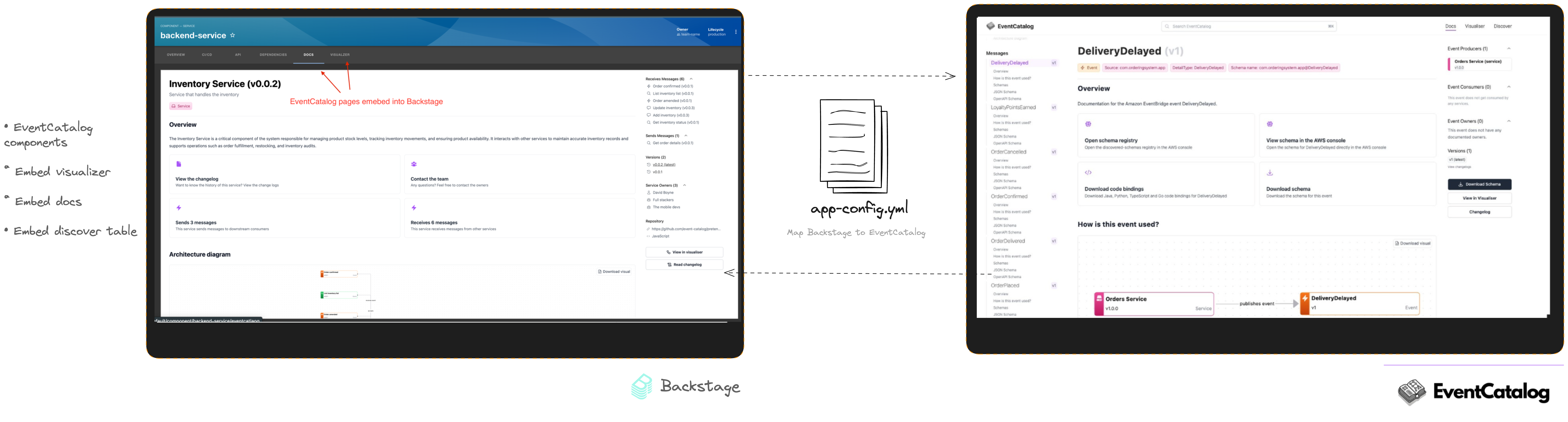
This plugin exposes React components that you can embed on your pages to display information from EventCatalog.
*Your EventCatalog has be hosted and the URL given to the app.config.yml file.*
* ``
* Used to embed whole pages of EventCatalog into your Backstage instance. You can add these as tabs to your pages, clicking on the tab will show the desired feature.
* ``
* Used to embed a widget (Card) on your existing pages. This component will display the visualiser on your page.
* ``
* Used to embed a widget (Card) on your existing pages. This component will display the explore (table) on your page. Great for displaying a list of messages your service produces/consumes.
*Note: If you want to embed private EventCatalog instances, raise an issue on GitHub and we can explore this*.
***
## Commercial Use[](#commercial-use "Direct link to Commercial Use")
This plugin requires a license key to be used.
You can get a 14 day trial license key to try the plugin out by going to [EventCatalog Cloud](https://eventcatalog.cloud).
You can try the Backstage plugin, or use EventCatalog Scale (as it's already included).
After the trial you can purchase a license to continue using this plugin, we have different plans to suit your organization.
See [pricing](/pricing.md) for more information.
*Have any questions? You can email us at `hello@eventcatalog.dev`.*