# Add resources to systems
Copy as Markdown[View as Markdown](/docs/development/guides/systems/add-resources-to-systems.md)
***
**Added in** `eventcatalog@4.0`
In EventCatalog, systems can directly reference:
* [Services](/docs/development/guides/resources/services/introduction.md)
* [Flows](/docs/development/guides/resources/flows/introduction.md)
* [Entities](/docs/development/guides/resources/entities/introduction.md)
* [Data stores](/docs/development/guides/resources/data/introduction.md)
Messages, APIs, schemas, and channels are usually documented through the services and messages inside the system.
## Add resources using frontmatter[](#add-resources-using-frontmatter "Direct link to Add resources using frontmatter")
Add resources to the system frontmatter using `services`, `flows`, `entities`, and `containers`.
/domains/Shopping/systems/cart-system/index.mdx
```
---
id: cart-system
name: Cart System
version: 1.0.0
# define services in this system
services:
- id: cart-api
version: 1.0.0
# define databases in this system
containers:
- id: cart-database
version: 1.0.0
# define documented business workflows part of this system
flows:
- id: checkout-flow
version: 1.0.0
# define any entities that belong to this system
entities:
- id: cart
version: 1.0.0
---
```
The `version` is optional. If no version is given, EventCatalog uses the latest version of the referenced resource.
## Keep resources inside the system folder[](#keep-resources-inside-the-system-folder "Direct link to Keep resources inside the system folder")
You can also define resources inside the system folder to keep related architecture documentation together.
* domains
/
* Shopping
/
* systems
/
* cart-system
/
* index.mdx
* services
/
* containers
/
* flows
/
This structure makes the system the entry point for the resources that make up that capability.
## Show the resource diagram[](#show-the-resource-diagram "Direct link to Show the resource diagram")
Add `` to the system page to show the resources inside the system.
/domains/Shopping/systems/cart-system/index.mdx
```
## Resource Diagram
```
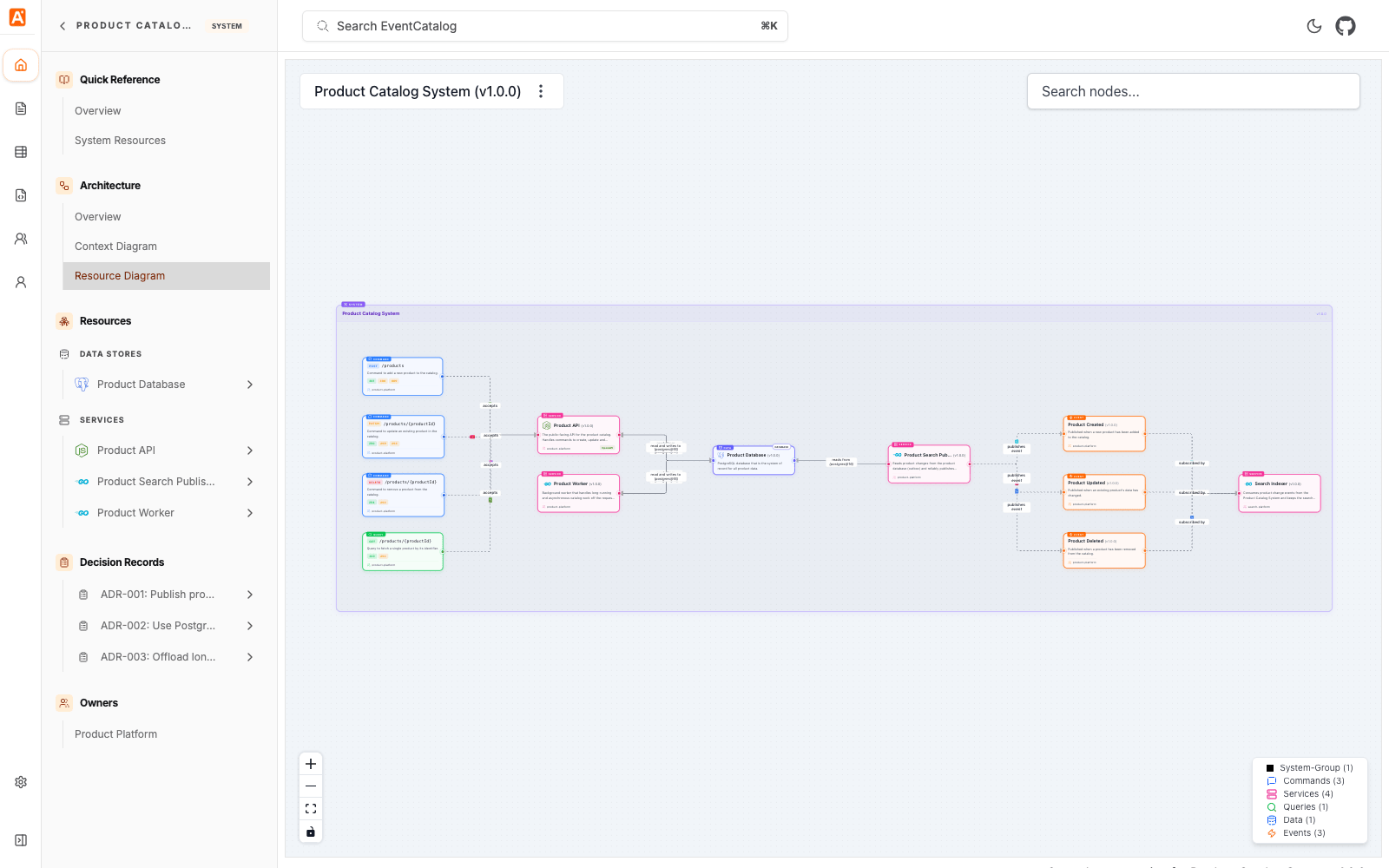
You can also open the resource diagram directly:
```
/visualiser/systems/{system-id}/{version}
```
For the complete list of supported fields, see the [systems reference](/docs/development/guides/systems/reference.md).