# Domain diagram
Copy as Markdown[View as Markdown](/docs/development/guides/domains/visualize-domains/domain-diagram.md)
***
**Added in** `eventcatalog@5.0.0`
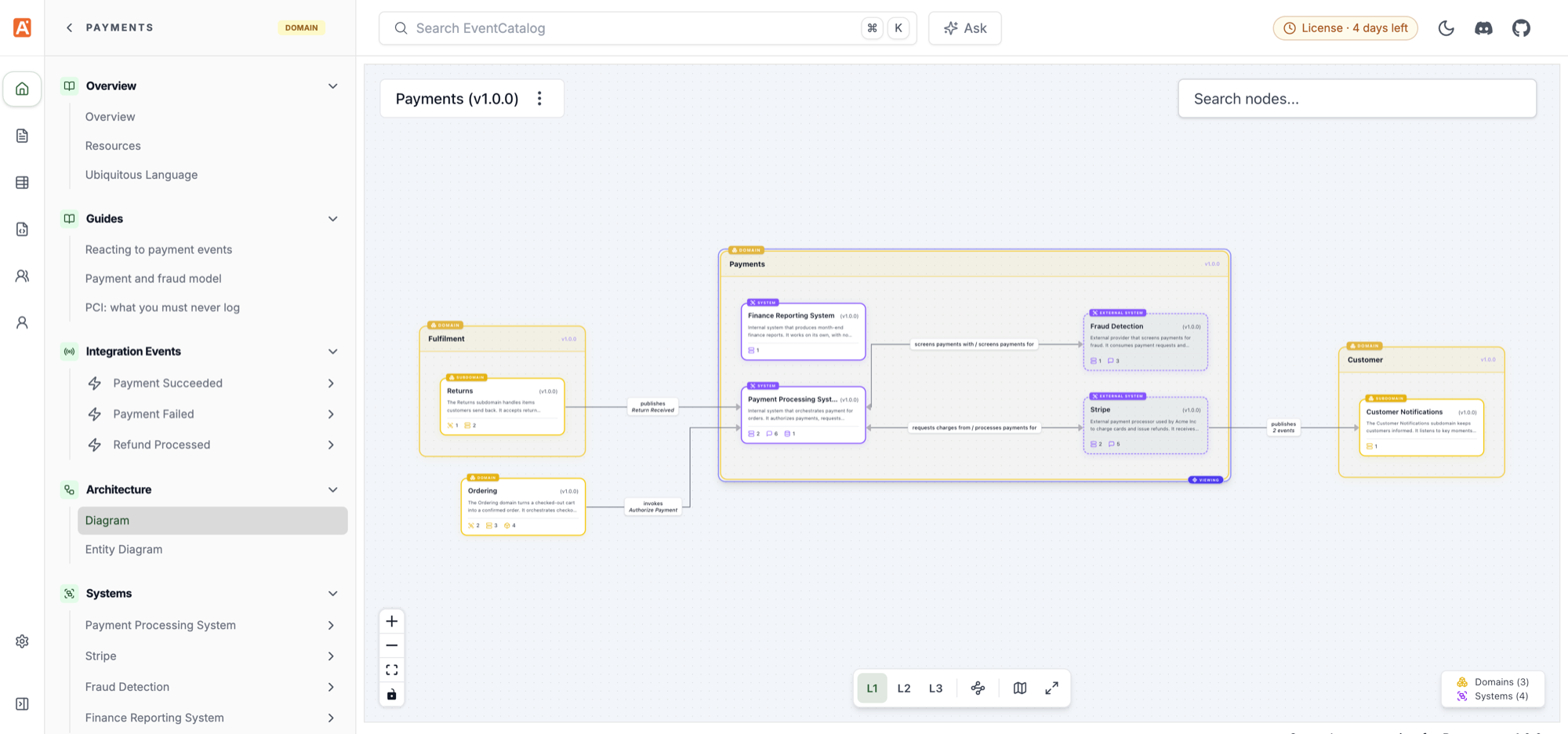
Every domain has a **Diagram** page. It shows the domain at three levels of detail, from the other domains it talks to down to the messages and channels its services send and receive.
Open it from **Diagram** in the **Architecture** section of the domain sidebar, or at:
```
/visualiser/domains/{domain-id}/{version}
```
## Levels[](#levels "Direct link to Levels")
Switch levels with **L1**, **L2** and **L3** in the canvas toolbar at the bottom of the diagram.
| Level | What it shows |
| ------ | ----------------------------------------------------------------------------------------------------------------- |
| **L1** | The domain with its systems and subdomains, and the other domains they send messages to or receive messages from. |
| **L2** | Expands the systems into their services and data stores, and how they connect. |
| **L3** | Adds the messages and channels. |
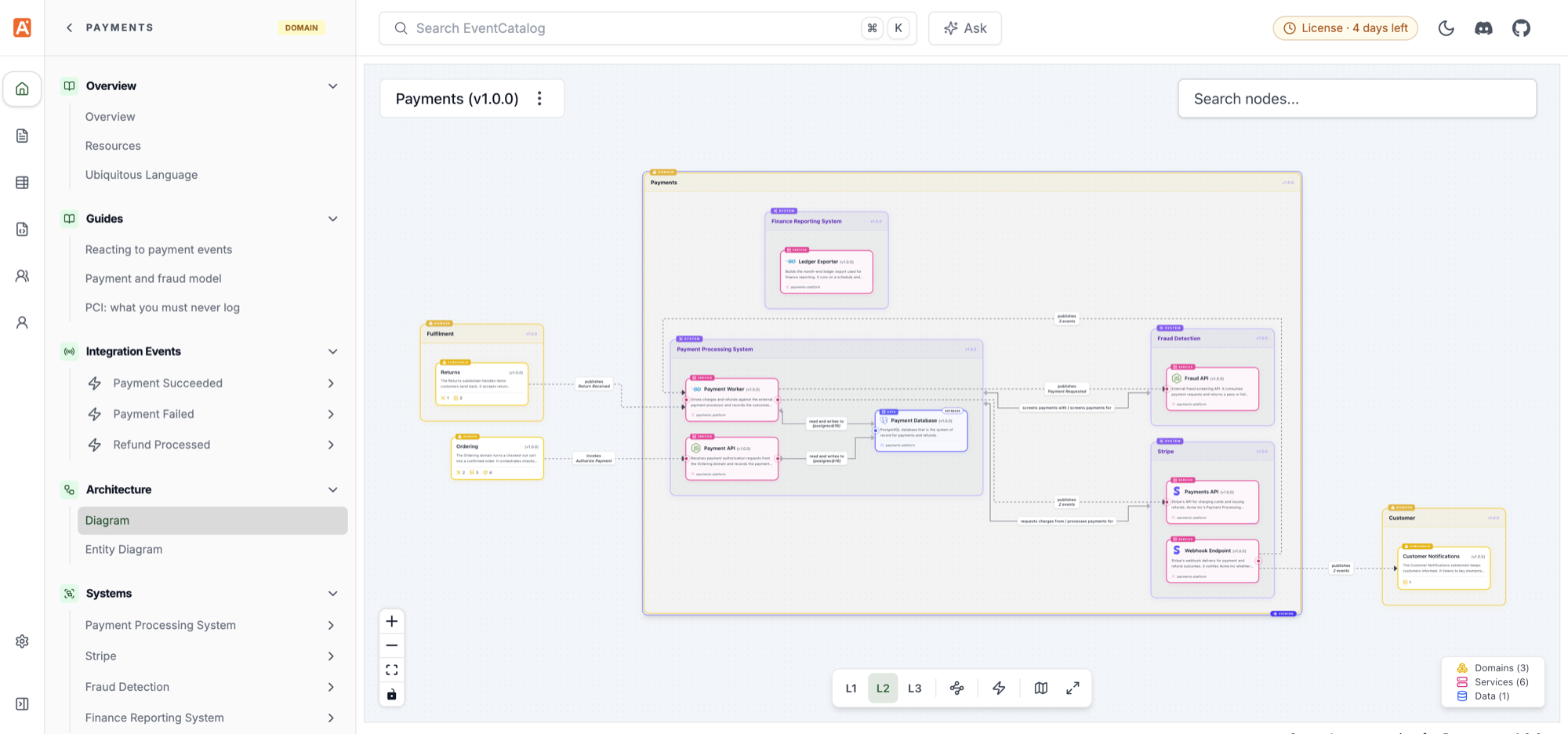
The page opens at level 1. The level is kept in the URL, so a shared link opens at the same level. Use `?level=` to open a level directly:
```
/visualiser/domains/Payments/1.0.0?level=2
```
### How resources are placed[](#how-resources-are-placed "Direct link to How resources are placed")
* Subdomains are shown as domains inside the domain, with their own systems and services. At L1, a subdomain without systems is a single card.
* Other domains' subdomains are shown inside a box for their parent domain.
* Services that are not in a system are shown with the resources they connect to.
* Messages and channels that only other domains send through are placed outside the domain.
* A domain without systems or subdomains opens at L2, and L1 is greyed out.
## Highlight cross-domain communication[](#highlight-cross-domain-communication "Direct link to Highlight cross-domain communication")
When the diagram includes other domains, the canvas toolbar has a **Highlight cross-domain communication** button. It picks out the edges to and from other domains on the level you are viewing. It doesn't change the level.
Use it to find where a domain depends on other domains, and which messages cross the domain boundary.
The canvas toolbar and menu also let you simulate messages, hide messages or channels, and hide resource types from the legend. See [NodeGraph interactive controls](/docs/development/components/components/nodegraph.md#interactive-controls).
## Show the diagram on the domain page[](#show-the-diagram-on-the-domain-page "Direct link to Show the diagram on the domain page")
Add `` to a domain page to embed its diagram. It opens at level 1.
/domains/Payments/index.mdx
```
---
id: Payments
name: Payments
version: 1.0.0
---
## Architecture
```
Learn more in the [NodeGraph component](/docs/development/components/components/nodegraph.md) docs.
## Turn off the diagram[](#turn-off-the-diagram "Direct link to Turn off the diagram")
Domains with [`visualiser: false`](/docs/development/guides/domains/reference.md#visualiser) in their frontmatter don't get a Diagram page.
Changed in EventCatalog v5
The domain's **System Diagram** and **Resource Diagram** pages are replaced by the single **Diagram** page. The old System Diagram route (`/visualiser/domains/{domain-id}/{version}/systems-context`) redirects to level 1.
The Domain Integration Map (`/visualiser/domain-integrations`) is removed. Level 1 of each domain's diagram shows how it integrates with other domains.
Layouts saved in dev mode for a domain's old Resource Diagram don't carry over to the new page. Save the layout again if you need it.