# Custom properties on resources
Copy as Markdown[View as Markdown](/docs/development/customization/custom-properties.md)
***
**Added in** `eventcatalog@4.2.3`
Custom properties let you add organization-specific metadata to a resource without changing EventCatalog's built-in resource model.
Custom property names must:
* be defined at the top level of the resource frontmatter
* start with `x-`
* contain at least one character after `x-`
Their values can be strings, numbers, booleans, arrays, or nested objects.
/services/PaymentAPI/index.mdx
```
---
id: PaymentAPI
name: Payment API
version: 1.0.0
summary: Authorizes and records payments.
x-operational-tier: 1
x-scrum-masters:
- David
- Andrew
x-on-call:
schedule: payments-primary
escalation-channel: '#payments-incidents'
---
```
You can add custom properties to domains, systems, services, agents, events, commands, queries, channels, flows, containers, entities, data products, diagrams, and ADRs.
## Why use custom properties?[](#why-use-custom-properties "Direct link to Why use custom properties?")
EventCatalog provides first-class fields for common concepts such as owners, messages, relationships, schemas, and repositories. Custom properties are useful when your organization needs metadata that is specific to its own platform or processes.
For example, you can use them to record:
* operational tiers, recovery objectives, or on-call schedules
* data classification, retention, or compliance requirements
* internal cost centres or business capabilities
* maturity scores or governance review dates
* metadata consumed by generators, plugins, or custom components
Custom properties are also useful when you want to introduce an internal convention gradually without requiring EventCatalog to understand or interpret the value.
tip
Use EventCatalog's built-in fields when they already describe the concept. Use custom properties for metadata that is specific to your organization.
## Render all custom properties[](#render-all-custom-properties "Direct link to Render all custom properties")
Add the `CustomProperties` component to the Markdown content of a resource to render every `x-*` property.
`CustomProperties` and `CustomProperty` are built-in components, so you do not need to import them.
/services/PaymentAPI/index.mdx
```
```
By default, the component uses **Custom properties** as its heading. Use the `title` prop to change it.
```
```
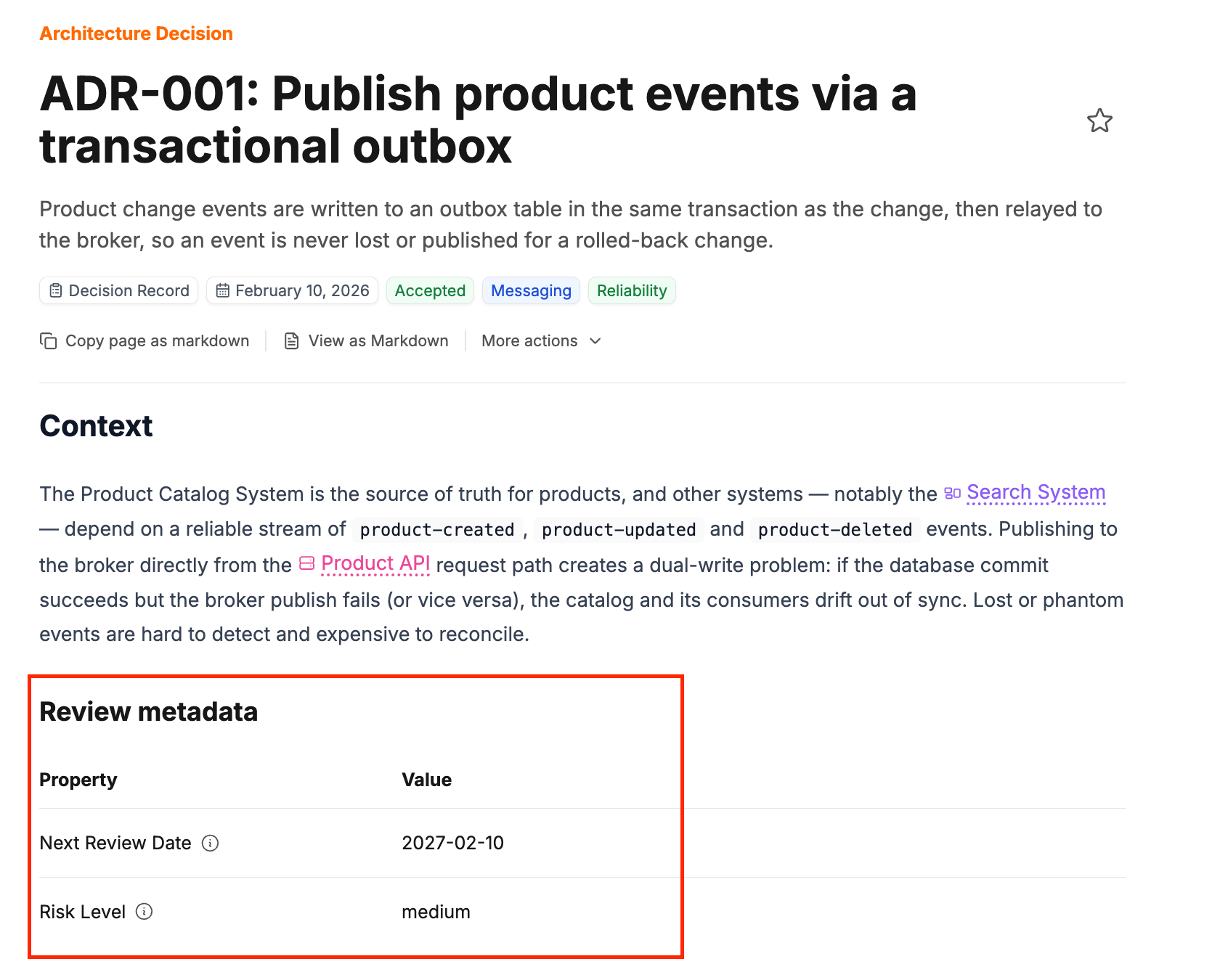
Property names are converted into readable labels. For example, `x-operational-tier` is displayed as **Operational Tier**. The original `x-*` name is available from the information icon beside the label.
Arrays are rendered as lists and nested objects are rendered as grouped values.
These component and JavaScript expression examples require an `.mdx` resource file. Plain `.md` files do not evaluate MDX components or expressions.
## Render one custom property[](#render-one-custom-property "Direct link to Render one custom property")
Use `CustomProperty` when you only want to show one value.
/services/PaymentAPI/index.mdx
```
```
You can override the generated label.
```
```
If the named property is not present on the resource, the component renders nothing.
## Reference custom properties in Markdown[](#reference-custom-properties-in-markdown "Direct link to Reference custom properties in Markdown")
Resource frontmatter is available through the `frontmatter` variable. Because custom property names contain hyphens, use JavaScript bracket notation.
/services/PaymentAPI/index.mdx
```
## Operations
Operational tier: {frontmatter['x-operational-tier']}
```
Dot notation does not work:
```
{/* This is interpreted as subtraction and causes a runtime error. */}
{frontmatter.x-operational-tier}
```
Render an array by mapping over its value.
```
{frontmatter['x-scrum-masters']?.map((name) => (
- {name}
))}
```
Nested object values can be referenced in the same way.
```
On-call schedule: {frontmatter['x-on-call'].schedule}
```
## Pass custom properties to your own components[](#pass-custom-properties-to-your-own-components "Direct link to Pass custom properties to your own components")
Custom components do not receive resource frontmatter automatically. Pass the values they need as props.
/services/PaymentAPI/index.mdx
```
import OperationalMetadata from '@catalog/components/operational-metadata.astro';
```
Read those props in your Astro component.
/components/operational-metadata.astro
```
---
interface Props {
tier: number;
scrumMasters?: string[];
}
const { tier, scrumMasters = [] } = Astro.props;
---
Operational tier: {tier}
{scrumMasters.map((name) => - {name}
)}
```
Read [Pass data into components](/docs/development/components/custom-components/pass-data-into-components.md) to learn more about using resource frontmatter with your own components.
## Naming and security guidance[](#naming-and-security-guidance "Direct link to Naming and security guidance")
* Use stable, descriptive names such as `x-operational-tier` or `x-data-classification`.
* Consider an organization namespace, such as `x-acme-cost-centre`, when properties may be shared across tools.
* Keep the meaning and expected value type consistent across resources.
* Do not store secrets, credentials, or private tokens in custom properties. Resource frontmatter is catalog content and may be included in generated output.
* Custom properties are stored and rendered, but EventCatalog does not automatically use them for relationships, diagrams, search behavior, or validation beyond the `x-*` naming requirement.